
Standard Webmail (Round Cube) slow performance mitigation
FIXED- Subscribe to RSS Feed
- Mark Topic as New
- Mark Topic as Read
- Float this Topic for Current User
- Bookmark
- Subscribe
- Printer Friendly Page
- Plusnet Community
- :
- Forum
- :
- Help with my Plusnet services
- :
- :
- Re: Standard Webmail (Round Cube) slow performance...


10-08-2019 2:45 PM - edited 10-08-2019 2:49 PM
- Mark as New
- Bookmark
- Subscribe
- Subscribe to RSS Feed
- Highlight
- Report to Moderator
The SUs have had this under constant review with Plusnet. After many months of looking at the obvious likely causes, it now looks as though a performance issue within the Round Cube Webmail client has been identified as being a significant contributor to the end user experience of slow loading email lists. Though other issues have been found and addressed, this one remains under investigation.
There is however a simple end user mitigation for the issue, which tests have shown makes a SIGNIFICANT performance difference. The issue appears to be related to the mail list display sort sequence. If a user has EVER changed the sort list from the default setting (none) - which lists newest email first - to something different … and then switches back to most recent item first using the column sort toggles, this DOES NOT result in the same configuration as per before changing the sort sequence. There remains an explicit sort setting which gives rise to the performance issue. Not exactly an obvious expectation.
To set the sort sequence back to the default setting requires EXPLICT user action...
- Log into webmail
- On the inbox list screen select LIST OPTIONS which is the little grid icon on the left of the column title bar
- Set sorting column to NONE
- Click save
- See the mailbox list display nearly instantly
Work continues to identify the cause of the delay in retrieving a sorted list. Squirrel Mail (Basic webmail) does not suffer this issue, so might be more pragmatic if you have a large mailbox which you wish to view in a sequence other than by date, most recent first.
In another browser tab, login into the Plusnet user portal BEFORE clicking the fault & ticket links
Superusers are not staff, but they do have a direct line of communication into the business in order to raise issues, concerns and feedback from the community.
If this post helped, please click the Thumbs Up and if it fixed your issue, please click the This fixed my problem green button below.
Fixed! Go to the fix.

Re: Standard Webmail (Round Cube) slow performance mitigation
12-08-2019 11:49 AM
- Mark as New
- Bookmark
- Subscribe
- Subscribe to RSS Feed
- Highlight
- Report to Moderator
Thank you, THANK YOU!
This issue has been frustrating me for years (I think...but it may only seem like 'years').
I don't use webmail very often, but when I do I ensure I've a nice cuppa coffee to help pass the time it took to do anything involving redisplaying the inbox list.
Obviously it'd be preferable if there wasn't an excruciatingly long wait to display a list after changing sort order, but at least I can now leave things in a default setup for speedier access the next time I log-in.
Many thanks for this information.

Re: Standard Webmail (Round Cube) slow performance mitigation
03-02-2020 10:27 AM
- Mark as New
- Bookmark
- Subscribe
- Subscribe to RSS Feed
- Highlight
- Report to Moderator
Wow. I have been suffering years. Thanks for this instant cure.
Re: Standard Webmail (Round Cube) slow performance mitigation
06-02-2020 10:43 PM
- Mark as New
- Bookmark
- Subscribe
- Subscribe to RSS Feed
- Highlight
- Report to Moderator
I'm now another happy user who has benefited from the step-by-step reconfiguration recommended. As noted in my separate post today in this forum, my Inbox messages wouldn't load at all. Resetting the sort-sequence solved the problem. So thanks to Townman for the advice.
Re: Standard Webmail (Round Cube) slow performance mitigation
17-02-2020 2:20 PM
- Mark as New
- Bookmark
- Subscribe
- Subscribe to RSS Feed
- Highlight
- Report to Moderator
Thanks so much for this simple end user mitigation!! 2 years of frustration at an end!
Pen

13-03-2020 11:42 AM
- Mark as New
- Bookmark
- Subscribe
- Subscribe to RSS Feed
- Highlight
- Report to Moderator
Click this tiny button:
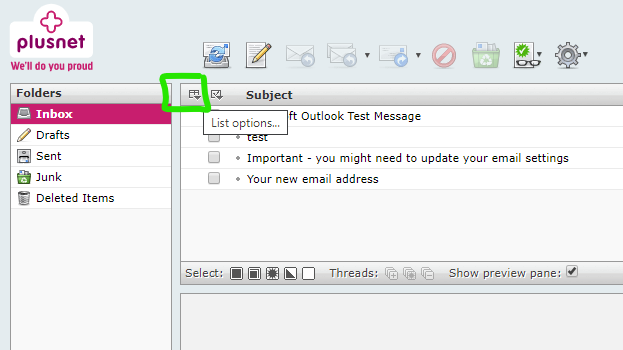
Then make sure this one is selected:
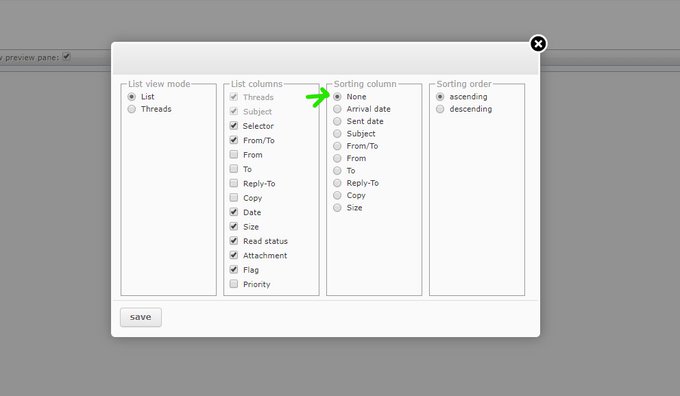
If you ever sort by a column, you'll need to go back in to reset this.
Ex-Plusnet Jobsbody
Re: Standard Webmail (Round Cube) slow performance mitigation
22-07-2020 2:11 PM
- Mark as New
- Bookmark
- Subscribe
- Subscribe to RSS Feed
- Highlight
- Report to Moderator
Good lord.
The amount of years I have been having slow email load ups and wasn't once notified to do this.
Thank you for putting this up here as it has definitely helped.
Gio,
Re: Standard Webmail (Round Cube) slow performance mitigation
22-10-2020 10:44 AM
- Mark as New
- Bookmark
- Subscribe
- Subscribe to RSS Feed
- Highlight
- Report to Moderator
This is now over a year of investigation. has the bug been sorted yet?
Re: Standard Webmail (Round Cube) slow performance mitigation
22-10-2020 10:53 AM
- Mark as New
- Bookmark
- Subscribe
- Subscribe to RSS Feed
- Highlight
- Report to Moderator
Unfortunately not. As far as we can tell it is a problem with the core Roundcube product, rather than anything we've implemented, so we'll need to make changes to the 3rd party product to resolve.
Ex-Plusnet Jobsbody
Re: Standard Webmail (Round Cube) slow performance mitigation
22-10-2020 7:24 PM
- Mark as New
- Bookmark
- Subscribe
- Subscribe to RSS Feed
- Highlight
- Report to Moderator
Which sounds to me like an admission you are not doing anything about it.
Re: Standard Webmail (Round Cube) slow performance mitigation
28-10-2020 9:55 AM
- Mark as New
- Bookmark
- Subscribe
- Subscribe to RSS Feed
- Highlight
- Report to Moderator
As Victor Meldrew would say "I don't believe it".
After years of slow loading emails was this really all it took to fix?
My emails are loading much quicker but will it also resolve the error messages when I try to delete emails?
That remains to be seen!
Re: Standard Webmail (Round Cube) slow performance mitigation
28-10-2020 12:50 PM
- Mark as New
- Bookmark
- Subscribe
- Subscribe to RSS Feed
- Highlight
- Report to Moderator
So, no, still the same irritating issues when trying to delete emails!

Re: Standard Webmail (Round Cube) slow performance mitigation
11-11-2020 4:30 PM
- Mark as New
- Bookmark
- Subscribe
- Subscribe to RSS Feed
- Highlight
- Report to Moderator
This issue has not been solved!
I got as far aschanging the values as suggestedin the solution.
Now all I get when trying to delete emails is either:
Server Error failed to send Fetch Command, or UID Copy Courier IMAP Server Shut Down by Signal.
This is immensely frustrating because the reason I'm trying to delete these (and several hundred emails) is to try and get round an Outlook Live email issue which won't allow me to delete emails from that system. Microsoft are investigating that apparently, but in the mean time they suggest we delete the emails from the 'host server' (ie Plusnet in my case) so that the emails don't get brought into the Outlook system.
Absolutely useless.
Plusnet, please sort out the issues I've highlighted with Webmail.
Re: Standard Webmail (Round Cube) slow performance mitigation
11-11-2020 4:40 PM
- Mark as New
- Bookmark
- Subscribe
- Subscribe to RSS Feed
- Highlight
- Report to Moderator
Slow webmail
It somewhat appears that any sorting or filtering on a large mailbox cripples the performance of RC webmail, where as the 'basic' webmail program (Squirrel Mail) is not affected. Using Squirrel Mail can be an effective way of accessing a mail box which is running slow with RC.
Some have found logging into their mailbox using this third party webmail client - https://mail2web.com helpful in clearing out clutter from their mailboxes.
In another browser tab, login into the Plusnet user portal BEFORE clicking the fault & ticket links
Superusers are not staff, but they do have a direct line of communication into the business in order to raise issues, concerns and feedback from the community.
If this post helped, please click the Thumbs Up and if it fixed your issue, please click the This fixed my problem green button below.
Re: Standard Webmail (Round Cube) slow performance mitigation
11-11-2020 5:02 PM
- Mark as New
- Bookmark
- Subscribe
- Subscribe to RSS Feed
- Highlight
- Report to Moderator
Unfortunately, Mail2Web just isn't working for me. I just keep getting "Login Failure. Please check your email address and re-enter your password.. Login again".
Have tried at least 10 times and even with older password I may have used.
- Subscribe to RSS Feed
- Mark Topic as New
- Mark Topic as Read
- Float this Topic for Current User
- Bookmark
- Subscribe
- Printer Friendly Page
- Plusnet Community
- :
- Forum
- :
- Help with my Plusnet services
- :
- :
- Re: Standard Webmail (Round Cube) slow performance...