
Computer Freezing
FIXED- Subscribe to RSS Feed
- Mark Topic as New
- Mark Topic as Read
- Float this Topic for Current User
- Bookmark
- Subscribe
- Printer Friendly Page
- Plusnet Community
- :
- Forum
- :
- Other forums
- :
- Tech Help - Software/Hardware etc
- :
- Re: Computer Freezing

Re: Computer Freezing
14-06-2026 6:01 PM
- Mark as New
- Bookmark
- Subscribe
- Subscribe to RSS Feed
- Highlight
- Report to Moderator
When looking around the BIOS settings I saw the CPU started at 36C and was at 44C about 10 minutes later. I don't run heavy workloads - just the occasional video from news channels would propably but the heaviest.
Couldn't see any trace of Secure-Boot-Update in Task Scheduler. Couldn't find Secure Boot Enabled in the BIOS settings.
Did the Event Log picture I posted earlier help?
I'm not an enthusiast as such. Setting up Linux was bad enough.
No new software as such installed recently. In the Task Manager Ithe only things I don't really recognise are igfzEM.exe and iusb3mon.exe
Thanks for all replies so far.
Brian

Re: Computer Freezing
14-06-2026 6:11 PM
- Mark as New
- Bookmark
- Subscribe
- Subscribe to RSS Feed
- Highlight
- Report to Moderator
Igfxem.exe is Intel's main control module for their graphics cards. This Intel module sits between the Intel Graphics card and the Windows OS. It allows your video card to rotate the screen, modify keyboard settings, along with several other important Intel graphic card features.
The iusb3mon in iusb3mon. dll stands for Intel(R) USB 3.0 Monitor, which is used by Windows to keep track of the functionality and usage of your USB 3.0 ports in the background and look for possible problems.31 Dec 2017

Re: Computer Freezing
14-06-2026 6:12 PM
- Mark as New
- Bookmark
- Subscribe
- Subscribe to RSS Feed
- Highlight
- Report to Moderator
The event log wasn’t helpful and the two files are safe, keep watching….
Re: Computer Freezing
14-06-2026 8:32 PM
- Mark as New
- Bookmark
- Subscribe
- Subscribe to RSS Feed
- Highlight
- Report to Moderator
Beaten again this time by @jab1 , must learn to reply quicker……
Re: Computer Freezing
15-06-2026 4:44 PM - edited 15-06-2026 4:51 PM
- Mark as New
- Bookmark
- Subscribe
- Subscribe to RSS Feed
- Highlight
- Report to Moderator
Only one freeze so far today.
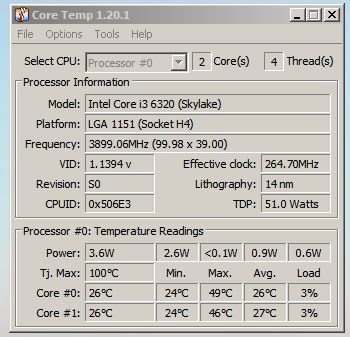
I downloaded Core Temp and have attached the results. I have seen the temp go as high as 28C.
Brian
Edit : Just seen spikes up to 45C while downloading images
Re: Computer Freezing
16-06-2026 11:21 AM
- Mark as New
- Bookmark
- Subscribe
- Subscribe to RSS Feed
- Highlight
- Report to Moderator
After installing Core Temp I found MyEventViewer and installed that.
Core Temp maxed out at 52C yesterday and is back up around that today.
This morning after bring the PC out of hibernation and setting MEV to auto refresh every 10 seconds I checked my email program (Pegasus) and initiated a email retrievel. It indicated 9 emails to download and then froze. On restart only 4 showed up in the program.
More to the point MEV showed a controller error on "raid..." - I foolishly didn't note the message as I expected it to be there when I restarted - it wasn't.
Brian
Re: Computer Freezing
16-06-2026 11:28 AM
- Mark as New
- Bookmark
- Subscribe
- Subscribe to RSS Feed
- Highlight
- Report to Moderator
@bmc That 52C is a little 'warm' - have you cleaned the internals of the case, and checked the thermal paste/pad?
If MEV showed an error, maybe your system is failing/getting tired?
Re: Computer Freezing
16-06-2026 1:58 PM
- Mark as New
- Bookmark
- Subscribe
- Subscribe to RSS Feed
- Highlight
- Report to Moderator
Unfortunately I know of no application that will write and save a log file just as the system freezes.
In MyEventViewer you can select only error and warnings displayed, check auto refresh is selected. Frequently check this log,.
You can leave the program running on your desktop then the log may show events leading up to the freeze.
Re: Computer Freezing
16-06-2026 2:08 PM
- Mark as New
- Bookmark
- Subscribe
- Subscribe to RSS Feed
- Highlight
- Report to Moderator
I posted a picture of the internals in #8 - doesn't look too bad but I guess I could run a feather duster over the heat sink. To look for thermal paste I would need to take the heat sink off which is something I'd prefer not to do though it seems relatively easy. Four bolts at the back of the PC (see attached picture).
I don't think the CPU overheating is the problem. It bearly got time to warm up today before the freeze.
Next time it happens I'll take a picture of MEV on my phone and note the exact error message. Looking at MEV I pressed the Refresh button a couple of hours ago and it's still chuntering away through the files (2378300 so far). CPU temps have got up to an average 50C with a spike of 65C. Loads are hovering around 50%.
Brian
Re: Computer Freezing
16-06-2026 2:40 PM
- Mark as New
- Bookmark
- Subscribe
- Subscribe to RSS Feed
- Highlight
- Report to Moderator
That’s big, 32k is an average log size. If you can look at the recent warnings & errors, If not delete all entries (It’s a menu option) and start again. If you’ve set show only warnings & errors then any entry should be noted. You may se a pattern emerging.
Re: Computer Freezing
16-06-2026 2:50 PM
- Mark as New
- Bookmark
- Subscribe
- Subscribe to RSS Feed
- Highlight
- Report to Moderator
I did consider aborting the Refresh but as it's gone on this long I'll let it run and see if it comes up with anything.
I'll set the menu option when I can to display only warnings and errors.
Brian
Re: Computer Freezing
16-06-2026 7:15 PM - edited 16-06-2026 7:15 PM
- Mark as New
- Bookmark
- Subscribe
- Subscribe to RSS Feed
- Highlight
- Report to Moderator
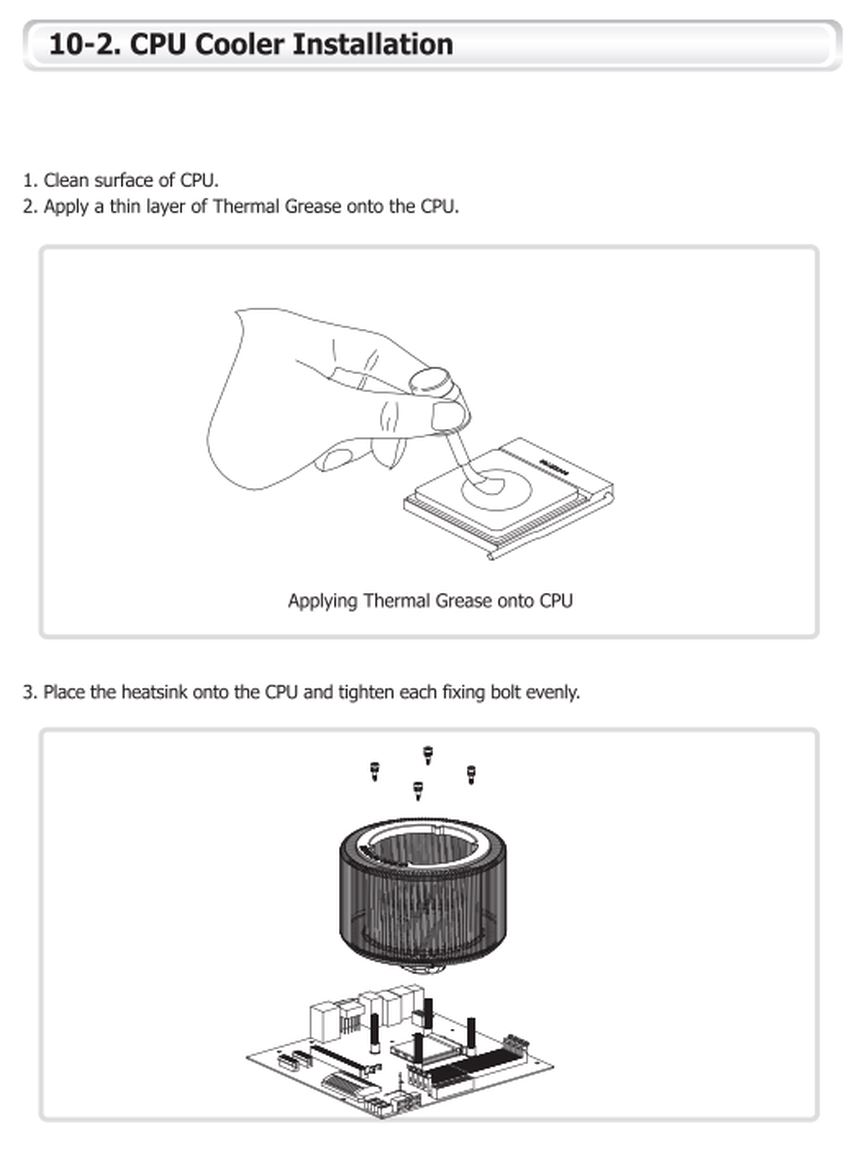
Think I've found the thermal paste issue. See attached.
Crashed MEV at "loading 2689050" - finally got fed up with it.
So, more information is at hand. Second freeze like the first soon after coming out of hibernation. Took a picture this time. The first error message just said "The following fatal alert was received : 70.
The second is shown in the attached.
Brian
16-06-2026 7:56 PM
- Mark as New
- Bookmark
- Subscribe
- Subscribe to RSS Feed
- Highlight
- Report to Moderator
Google is helpful :
stornvme.sys is the native Windows storage miniport driver responsible for communicating with high-speed NVMe solid-state drives.
So could be either disk problems - but there's no disk errors showing,
or disk driver problems - check version on manufacturers site.



Re: Computer Freezing
16-06-2026 9:47 PM
- Mark as New
- Bookmark
- Subscribe
- Subscribe to RSS Feed
- Highlight
- Report to Moderator
Something you could try which won't cost anything or take much time would be to reseat all components such as memory and SSDs.
Re: Computer Freezing
17-06-2026 3:35 PM
- Mark as New
- Bookmark
- Subscribe
- Subscribe to RSS Feed
- Highlight
- Report to Moderator
Thanks for the nudge towards Google. I've had a look at "Schannel" and understand the warnings from that. I'm also getting an error from WinMgnt
"//./root/CIMV2
SELECT * FROM __InstanceModificationEvent WITHIN 60 WHERE TargetInstance ISA "Win32_Processor" AND TargetInstance.LoadPercentage > 99
0x80041003"
It's not freezing the computer so I'm not worried about it. It may have something to do with my Pegasus Mail program. Who cares.
I have a MVMe Samsung MZVPV256 SCSI Disk Device. M/S are showing the driver as up to date and there's no sign of any drivers on the Samsung site. Now that I have somewhere to start I can contact the PC suppliers (QuietPC) who offer lifetime technical support so long as you own the machine.
Thanks for the suggestion I've give it a try sometime.
The secondary SSD's are easy enough - they are all on "hot" caddies . I can simply pull then out and put them back in again.
The operating MVMe SSD is another matter. If you look at the picture I posted in #8 the SSD is hidden by the heat sink. The connnector is on a "swivel" and is held down by a fiddly small screw. A begger to remove (I have done it once before).
The memory cards are to the right of the heat sink and look easy enough to remove and put back.
Brian
- Subscribe to RSS Feed
- Mark Topic as New
- Mark Topic as Read
- Float this Topic for Current User
- Bookmark
- Subscribe
- Printer Friendly Page
- Plusnet Community
- :
- Forum
- :
- Other forums
- :
- Tech Help - Software/Hardware etc
- :
- Re: Computer Freezing