
Disconnects - Help Please
- Subscribe to RSS Feed
- Mark Topic as New
- Mark Topic as Read
- Float this Topic for Current User
- Bookmark
- Subscribe
- Printer Friendly Page
- Plusnet Community
- :
- Forum
- :
- Help with my Plusnet services
- :
- Broadband
- :
- Re: Disconnects - Help Please


Re: Disconnects - Help Please
18-01-2023 11:37 AM
- Mark as New
- Bookmark
- Subscribe
- Subscribe to RSS Feed
- Highlight
- Report to Moderator
Double check the settings. Which router, which version of router stats and what options are you using please? As things stand this is not going to help. You could also try xDSL Stats.
Yes it could be anything anywhere causing the issue.
In another browser tab, login into the Plusnet user portal BEFORE clicking the fault & ticket links
Superusers are not staff, but they do have a direct line of communication into the business in order to raise issues, concerns and feedback from the community.
If this post helped, please click the Thumbs Up and if it fixed your issue, please click the This fixed my problem green button below.

Re: Disconnects - Help Please
18-01-2023 5:37 PM
- Mark as New
- Bookmark
- Subscribe
- Subscribe to RSS Feed
- Highlight
- Report to Moderator
It's finding the time for all this, it's not really the end users responsibility.
I understand what you are saying but there is very little in our home that could be responsible.
The router is isolated from other items. The only switching, is as I said, the CHeating. But I just tested that.
And the pattern in that log posted a bit back, seems so regular.
If I find time, I'll see, but I think you guys need to dig a bit deeper
Re: Disconnects - Help Please
18-01-2023 6:24 PM
- Mark as New
- Bookmark
- Subscribe
- Subscribe to RSS Feed
- Highlight
- Report to Moderator
Remember like you, supper users are customer. Digging deep by another user is being done for you. Neither any ISP of BT Openreach is going to identify a REIN issue as well as a customer can do it for themselves. You certainly are not going to gate a BT engineer out at 2am.
The problem might well not be in your home, but at the moment there is no clarity what it is. Good line stats is your best way forward - they might or might not identify an issue. This looks obscure and things need to be eliminated ... or just lived with - line disconnections less than 3 per day are not to be unexpected.
Is there anything in BTw's logs which indicate the causes of the 2am disconnections please?
In another browser tab, login into the Plusnet user portal BEFORE clicking the fault & ticket links
Superusers are not staff, but they do have a direct line of communication into the business in order to raise issues, concerns and feedback from the community.
If this post helped, please click the Thumbs Up and if it fixed your issue, please click the This fixed my problem green button below.
Re: Disconnects - Help Please
19-01-2023 8:07 AM
- Mark as New
- Bookmark
- Subscribe
- Subscribe to RSS Feed
- Highlight
- Report to Moderator
Sorry
I'm not sure what to do next
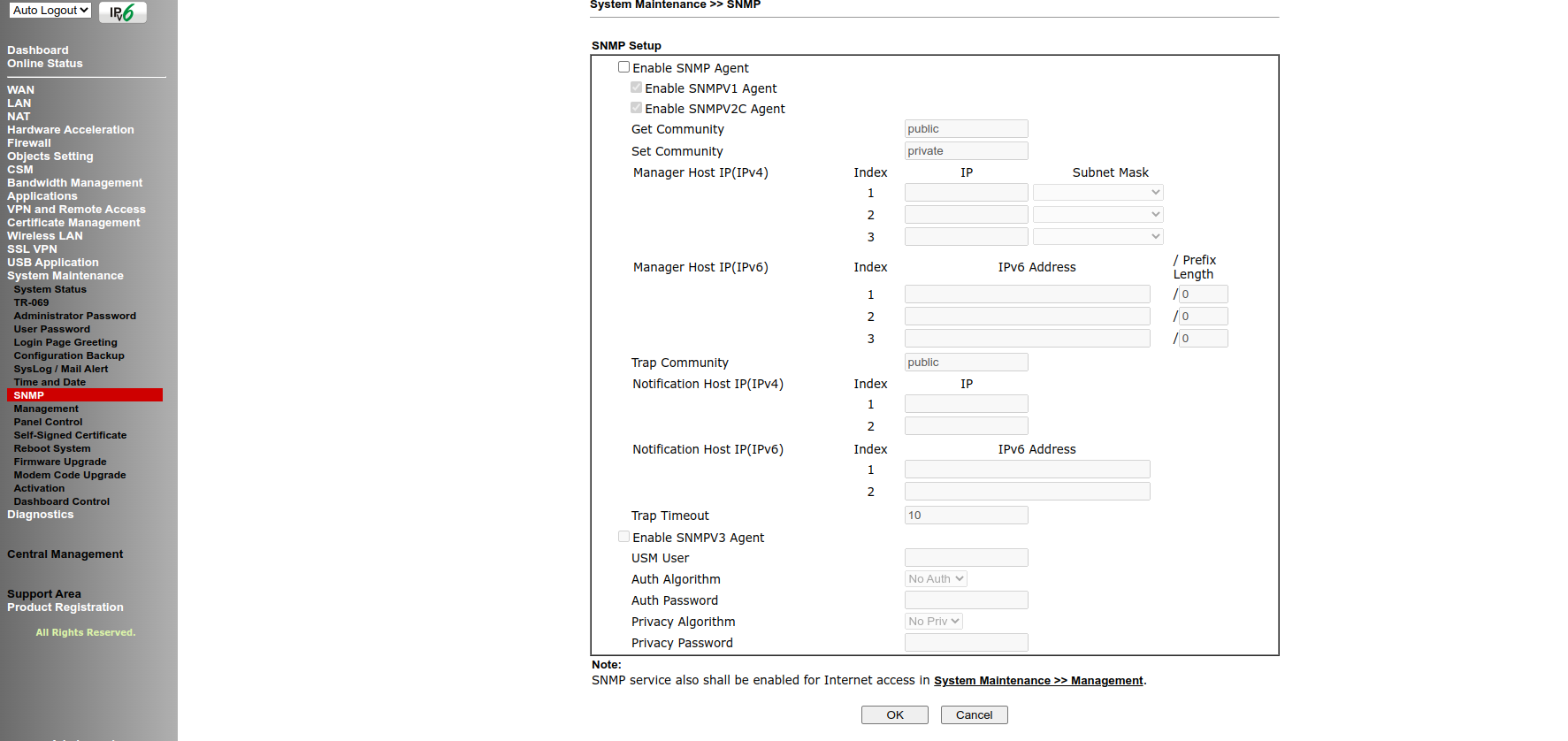
My router has a SNMP setup section. It was referred to in one of the links I followed from you
Not sure what to do though
Re: Disconnects - Help Please
19-01-2023 8:10 AM
- Mark as New
- Bookmark
- Subscribe
- Subscribe to RSS Feed
- Highlight
- Report to Moderator


Re: Disconnects - Help Please
19-01-2023 8:12 AM
- Mark as New
- Bookmark
- Subscribe
- Subscribe to RSS Feed
- Highlight
- Report to Moderator
@Townman there aren't any logs that show us a specific reason for disconnections (as much as that would be VERY helpful!)
@superuser, I've tested the line again and the results are flagging up a potential problem with your wiring or equipment, have you been able to try connecting to the test socket yet?




Re: Disconnects - Help Please
19-01-2023 9:52 AM
- Mark as New
- Bookmark
- Subscribe
- Subscribe to RSS Feed
- Highlight
- Report to Moderator
Router stats or xDSL stats is the best way forward, along with the standard elimination of internal wiring. The Plusnet update suggests an issue on the consumer side if the NTE5.
Do the router logs indicate if there was a loss of sync or just a loss of PPP? I have (rashly) taken your “disconnection” statements to imply a kiss of sync, rather than just PPP. They are not the same.
@adamwalker I thought BTw’s systems recorded disconnection causes - notably if there was a loss of sync, as opposed to a simple loss of PPP due to DLM activity.
In another browser tab, login into the Plusnet user portal BEFORE clicking the fault & ticket links
Superusers are not staff, but they do have a direct line of communication into the business in order to raise issues, concerns and feedback from the community.
If this post helped, please click the Thumbs Up and if it fixed your issue, please click the This fixed my problem green button below.
Re: Disconnects - Help Please
19-01-2023 10:05 AM
- Mark as New
- Bookmark
- Subscribe
- Subscribe to RSS Feed
- Highlight
- Report to Moderator
@adamwalker I do not have a microfilter. Or a way to connect to that fitting, it's not a RJ11
I appreciate your help everyone
There is quite a bit of old wiring around the house with connections and stuff. I did question that a year ago when we moved in, as we had an engineer come to put a master socket in, as there wasn't one. That has fairly recently been looked at because the one they originally put in a year go was previously used and had a broken clip. I think that is OK now, but I would not be surprised if the external wiring to the pole is dodgy.
The Draytek Router I am using now is one I have previously used without issue, and recently replaced another router (Asus) which was faulty.
The same disconnections were present when using the Asus, but the Asus was not syncing to the expected speed. Hence I switched to the Draytek. I wasn't originally using the Draytek simply because it's not dual band wifi.
Re: Disconnects - Help Please
19-01-2023 10:13 AM
- Mark as New
- Bookmark
- Subscribe
- Subscribe to RSS Feed
- Highlight
- Report to Moderator
@Townman In layman's terms, I guess loss of sync means line speed is dropping ?
If that's what you mean, no
When connected the line is good, speed excellent and has not dropped.
On the contrary, since switching to the Draytek speed is much better and sync is stable.
Some of your other comments are basically mumbo jumbo to me a mere mortal
Re: Disconnects - Help Please
19-01-2023 10:16 AM
- Mark as New
- Bookmark
- Subscribe
- Subscribe to RSS Feed
- Highlight
- Report to Moderator
No worries @superuser, give me a shout if you want us to go down the fault investigation route but it would be best to try and rule that out first if you can.
Re: Disconnects - Help Please
19-01-2023 10:23 AM
- Mark as New
- Bookmark
- Subscribe
- Subscribe to RSS Feed
- Highlight
- Report to Moderator
@adamwalker There is no internal wiring really. Just a Belkin RJ11 from the router to the Master socket. Everything else is what openreach did November 2021
If a fault is showing, it probably needs investigating

Re: Disconnects - Help Please
19-01-2023 10:33 AM
- Mark as New
- Bookmark
- Subscribe
- Subscribe to RSS Feed
- Highlight
- Report to Moderator
There isn't a fault showing just that there's a potential wiring issue within your home, we can still go ahead and book an engineer appointment if you like, I just wouldn't want that to waste your time in case there's anything you could identify as being a cause first.
Re: Disconnects - Help Please
19-01-2023 10:50 AM - edited 19-01-2023 10:51 AM
- Mark as New
- Bookmark
- Subscribe
- Subscribe to RSS Feed
- Highlight
- Report to Moderator
@superuser wrote:
Some of your other comments are basically mumbo jumbo to me a mere mortal
It is not mumbo jumbo as you put it, but it might be something you could ask about, if you do not know.
There is no obvious cause of the disconnection you are concerned about, they do appear to occur at a couple of fixed times, but do not appear to be overly concerning as the line quickly reconnects and is otherwise stable through the rest of the day. Fixed time point to something controlled, either engineering work or something on a timer - somewhere or another. Off at 2am and on at 5:.30am could for example be street lighting.
Line speed "dropping" is an unclear term - do you mean that after the disconnection the line speed is lower than what it was before the disconnection? That would clearly indicate that the sync dropped and that would strongly suggest line noise / RFI / DLM (Dynamic Line Management).
BT Wholesale back end maintenance work could lead to a loss of the PPP (logical) connection without dripping the sync. Being clear about this helps to identify the potential source of the issue.
Given the late additional information, your really need to take a look at the internal wiring before spending more time on this. Can you please describe in detail the telephone wiring involved here.
This video covers a lot of the ground in good clear simple detail - https://youtu.be/-Yw494T7ZYY
You need to check things out from the test socket. If you do not have a "dongle" filter, you need one and they are readily available at most hardware shops, Currys (PC World) and B&Q.
EDIT: Posts crossing whilst looking for relevant help / guidance.
In another browser tab, login into the Plusnet user portal BEFORE clicking the fault & ticket links
Superusers are not staff, but they do have a direct line of communication into the business in order to raise issues, concerns and feedback from the community.
If this post helped, please click the Thumbs Up and if it fixed your issue, please click the This fixed my problem green button below.
Re: Disconnects - Help Please
19-01-2023 10:52 AM
- Mark as New
- Bookmark
- Subscribe
- Subscribe to RSS Feed
- Highlight
- Report to Moderator
@adamwalker As I said, there is no wiring I just plug right in to the Master
I might be able to get a micro filter from a local second hand shop
I used to have loads of the darn things lying around
Re: Disconnects - Help Please
19-01-2023 10:54 AM - edited 19-01-2023 10:56 AM
- Mark as New
- Bookmark
- Subscribe
- Subscribe to RSS Feed
- Highlight
- Report to Moderator
@superuser wrote:
Just a Belkin RJ11 from the router to the Master socket.
What grade of RJ11 cable? Telephone (voice) or high speed data grade?
... I would not risk a filter from a second hand shop - you have no assurance that it is not damaged in a way you cannot see.
In another browser tab, login into the Plusnet user portal BEFORE clicking the fault & ticket links
Superusers are not staff, but they do have a direct line of communication into the business in order to raise issues, concerns and feedback from the community.
If this post helped, please click the Thumbs Up and if it fixed your issue, please click the This fixed my problem green button below.
- Subscribe to RSS Feed
- Mark Topic as New
- Mark Topic as Read
- Float this Topic for Current User
- Bookmark
- Subscribe
- Printer Friendly Page
- Plusnet Community
- :
- Forum
- :
- Help with my Plusnet services
- :
- Broadband
- :
- Re: Disconnects - Help Please