
Waiting for PADO packets
- Subscribe to RSS Feed
- Mark Topic as New
- Mark Topic as Read
- Float this Topic for Current User
- Bookmark
- Subscribe
- Printer Friendly Page
- Plusnet Community
- :
- Forum
- :
- Help with my Plusnet services
- :
- My Router
- :
- Re: Waiting for PADO packets

Waiting for PADO packets
07-01-2023 11:44 AM
- Mark as New
- Bookmark
- Subscribe
- Subscribe to RSS Feed
- Highlight
- Report to Moderator
Bit of syslog if anyone is interested
Sat Jan 7 07:15:09 2023 daemon.warn pppd[4382]: Timeout waiting for PADO packets
Sat Jan 7 07:15:09 2023 daemon.err pppd[4382]: Unable to complete PPPoE Discovery
Sat Jan 7 07:15:09 2023 daemon.info pppd[4382]: Exit.
Sat Jan 7 07:15:09 2023 daemon.notice netifd: Interface 'wan' is now down
Sat Jan 7 07:15:09 2023 daemon.notice netifd: Interface 'wan' is disabled
Sat Jan 7 07:15:09 2023 daemon.notice netifd: Interface 'wan' is enabled
Sat Jan 7 07:15:09 2023 daemon.notice netifd: Interface 'wan' is setting up now


Re: Waiting for PADO packets
07-01-2023 11:50 AM
- Mark as New
- Bookmark
- Subscribe
- Subscribe to RSS Feed
- Highlight
- Report to Moderator
Assuming it's a Hub Two, do you have anything connected to the WAN port?
You use one of the LAN ports for the router connection.
Dan
Superusers are not staff, but they do have a direct line of communication into the business in order to raise issues, concerns and feedback from the community.
Re: Waiting for PADO packets
07-01-2023 11:55 AM
- Mark as New
- Bookmark
- Subscribe
- Subscribe to RSS Feed
- Highlight
- Report to Moderator
Wan port is empty, phone line is plugged in for WAN. Lan port feeds my router via a managed switch.
Re: Waiting for PADO packets
07-01-2023 12:07 PM
- Mark as New
- Bookmark
- Subscribe
- Subscribe to RSS Feed
- Highlight
- Report to Moderator
When you say " Lan port feeds my router via a managed switch" is there a reason for this, the expected router to modem connection would be a dedicated connection.
Superusers are not staff, but they do have a direct line of communication into the business in order to raise issues, concerns and feedback from the community.


Re: Waiting for PADO packets
07-01-2023 12:08 PM - edited 07-01-2023 12:09 PM
- Mark as New
- Bookmark
- Subscribe
- Subscribe to RSS Feed
- Highlight
- Report to Moderator
@Austen88
Deleted @Dan_the_Van got there first.
Moderator and Customer
If this helped - select the Thumb
If it fixed it, help others - select 'This Fixed My Problem'
Re: Waiting for PADO packets
07-01-2023 12:55 PM
- Mark as New
- Bookmark
- Subscribe
- Subscribe to RSS Feed
- Highlight
- Report to Moderator
I can give it a direct port but I've not had an issue with it in this configuration in the past.
Re: Waiting for PADO packets
07-01-2023 1:12 PM
- Mark as New
- Bookmark
- Subscribe
- Subscribe to RSS Feed
- Highlight
- Report to Moderator
It could be you're getting disconnects between the modem and router or DSL drops.
You can check the Hub Two logs by connecting a pc to one of the LAN ports of the Hub with an IP Address in the range of the Hub which would be 192.168.1.0/24 assuming it (the Hub) remains on the default address of 192.168.1.254.
From the home page navigate to Advanced settings > Technical log > Event log select category WAN, the time/date will be wrong as when in bridge mode it starts at 00:00 01 Oct.
HTH
Superusers are not staff, but they do have a direct line of communication into the business in order to raise issues, concerns and feedback from the community.


Re: Waiting for PADO packets
07-01-2023 5:56 PM
- Mark as New
- Bookmark
- Subscribe
- Subscribe to RSS Feed
- Highlight
- Report to Moderator
@Austen88 wrote:
Just trying to determine when in bridge mode the Plusnet hub just acts as a medium converter or if it acts as an endpoint (if that makes sense?)
To answer this question, it acts as a dumb modem, so the suggestion this could be a line/DSL problem is a sensible one.
Bob Pullen
Plusnet Product Team
If I've been helpful then please give thanks ⤵
Re: Waiting for PADO packets
07-01-2023 6:00 PM
- Mark as New
- Bookmark
- Subscribe
- Subscribe to RSS Feed
- Highlight
- Report to Moderator
I have been out all day but just did a cable swap from modem to switch and it stayed pink. As soon as I turned on a streaming service it dropped again 😪
I'll try and get on the modem once I have the toddler down to see if there's anything relevant in sys log.
Re: Waiting for PADO packets
08-01-2023 11:54 AM
- Mark as New
- Bookmark
- Subscribe
- Subscribe to RSS Feed
- Highlight
- Report to Moderator
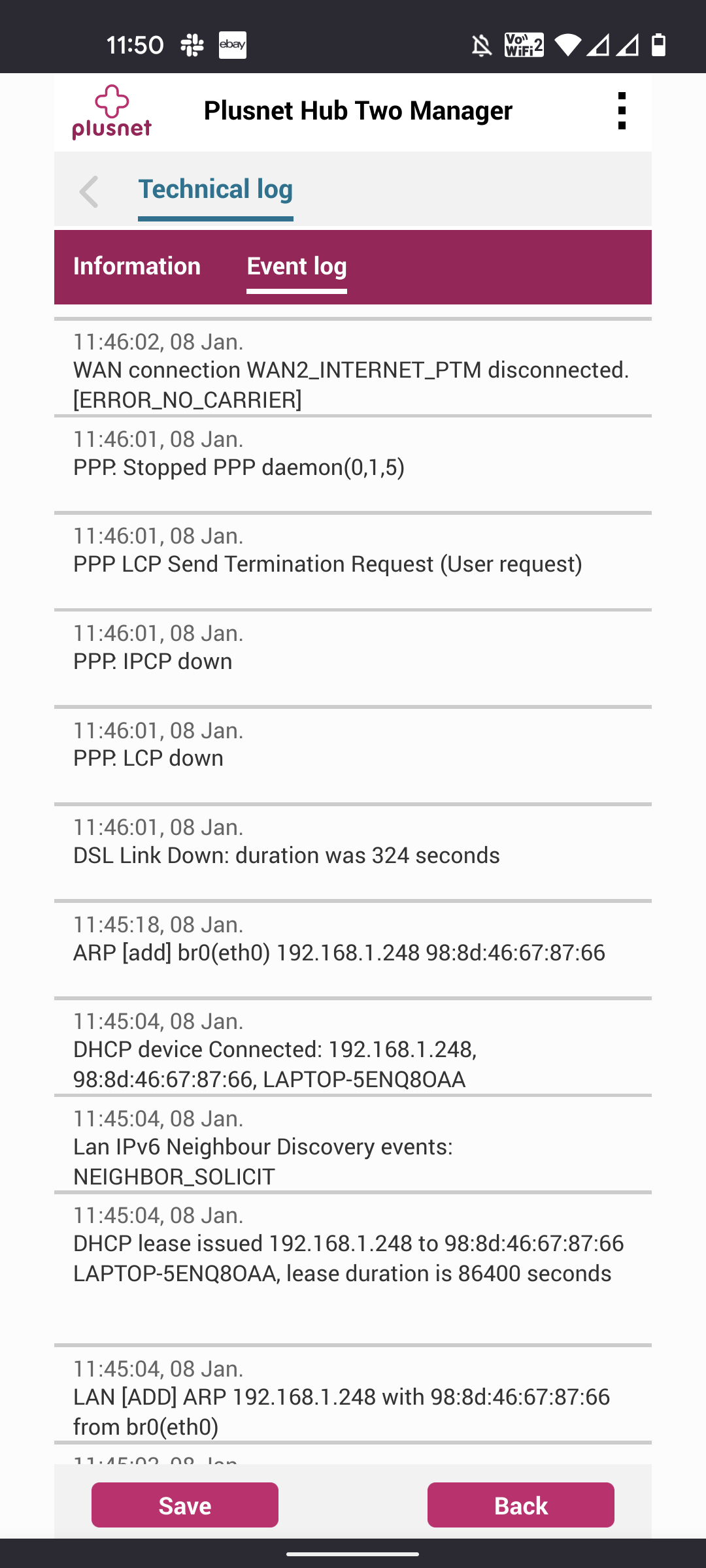
I reset my hub to default just changed the admin pw. Then plugged in a pre configured ubiquiti ap, 4-5 WiFi clients. This was after a drop, dropped.again pretty soon after, I've attached what I think is the relevant sys log.
Re: Waiting for PADO packets
08-01-2023 12:39 PM
- Mark as New
- Bookmark
- Subscribe
- Subscribe to RSS Feed
- Highlight
- Report to Moderator
The DSL down message is not what you want to see, this causes PPP link down message you noted on your router.
For a stable broadband connection it important for the phone line to clear of noise, using a landline phone you can check by dialling 17070 and taken option 2.
I see you have a line fault open so hopefully it will be resolved tomorrow.
HTH
Superusers are not staff, but they do have a direct line of communication into the business in order to raise issues, concerns and feedback from the community.
Re: Waiting for PADO packets
11-01-2023 11:58 AM
- Mark as New
- Bookmark
- Subscribe
- Subscribe to RSS Feed
- Highlight
- Report to Moderator
Is anyone able to give me more details on this..
Fault ID: 894441
I've been told its resolved, I'm just interested in what the issue was (I work for an isp) cheers!
- Subscribe to RSS Feed
- Mark Topic as New
- Mark Topic as Read
- Float this Topic for Current User
- Bookmark
- Subscribe
- Printer Friendly Page
- Plusnet Community
- :
- Forum
- :
- Help with my Plusnet services
- :
- My Router
- :
- Re: Waiting for PADO packets