
Sending to Gmail addresses
- Subscribe to RSS Feed
- Mark Topic as New
- Mark Topic as Read
- Float this Topic for Current User
- Bookmark
- Subscribe
- Printer Friendly Page
- Plusnet Community
- :
- Forum
- :
- Help with my Plusnet services
- :
- :
- Re: Sending to Gmail addresses

Sending to Gmail addresses
29-04-2024 9:43 AM
- Mark as New
- Bookmark
- Subscribe
- Subscribe to RSS Feed
- Highlight
- Report to Moderator
I too have this issue sending to Gmail accounts. I have read the other posts and it looks like I need someone from Plusnet to apply 'the fix' to my email accounts. So please could someone do that for me or tell me how to do it myself.
Re: Sending to Gmail addresses
29-04-2024 11:48 AM
- Mark as New
- Bookmark
- Subscribe
- Subscribe to RSS Feed
- Highlight
- Report to Moderator
Is it this your problem: messages to gmail addresses being returned undeliverable. The solution I found was to change gmail to googlemail, and it worked (though obviously not satisfactory). Haven't been advised of anything PlusNet could do.


Re: Sending to Gmail addresses
29-04-2024 11:54 AM
- Mark as New
- Bookmark
- Subscribe
- Subscribe to RSS Feed
- Highlight
- Report to Moderator
There are a multitude of different scenarios none of which have a Plusnet instigated fix on a per customer basis.
It would help if you described your scenario.
If you are sending email from your own domain name which is hosted by Plusnet then YOU implement the fix in the user portal as described in those other threads.
If you are sending email using you own domain name hosted somewhere else via Plusnet’s relay services (not ideal) then YOU implement the fix with your hosting provider as described in those other threads.
If your domain is hosted by Plusnet on one of the legacy brands, there probably is no fix.
Context is everything.
In another browser tab, login into the Plusnet user portal BEFORE clicking the fault & ticket links
Superusers are not staff, but they do have a direct line of communication into the business in order to raise issues, concerns and feedback from the community.
If this post helped, please click the Thumbs Up and if it fixed your issue, please click the This fixed my problem green button below.
Re: Sending to Gmail addresses
29-04-2024 12:41 PM
- Mark as New
- Bookmark
- Subscribe
- Subscribe to RSS Feed
- Highlight
- Report to Moderator
I would like to tag on to this thread. I am with Plusnet and we have our own domain name and use Outlook 2019. I don't have much technical expertise.
All emails sent to individuals with gmail or yahoo email addressed are delivery failures. I have a gmail account so have to use that to ensure delivery. I am aware that Plusnet are now not "trusted", if that is the correct terminology. Gmail is awful compared to Outlook, but never mind.
However what I have noticed recently is, if I send emails to individuals with other email accounts they never respond and when I chase them up or they eventually respond they say the email went into their Spam folder so they didn't see it or only by chance many weeks later.
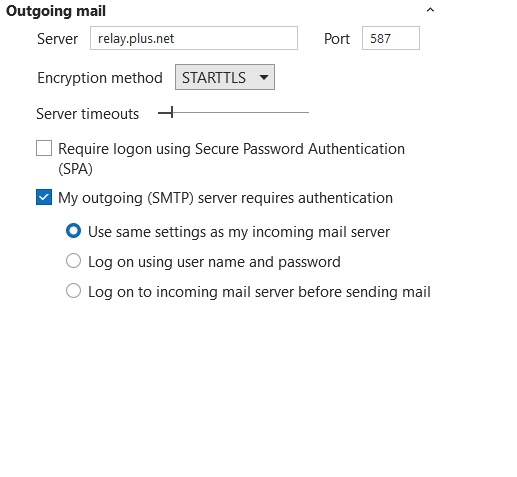
The most recent ones were sent to individuals using talk21.com and outlook.com. It's getting now that I can't trust any new email to be delivered. I suppose their providers have also blacklisted Plusnet. I have attached my outgoing email settings POP/STMP. Is this something I have to live with? Thank you.

Re: Sending to Gmail addresses
29-04-2024 12:44 PM - edited 29-04-2024 12:48 PM
- Mark as New
- Bookmark
- Subscribe
- Subscribe to RSS Feed
- Highlight
- Report to Moderator
@cornbunting I am with Plusnet and we have our own domain name
As per the previous post to yours , where is your domain hosted ?
I suppose their providers have also blacklisted Plusnet.
Its not that Plusnet is blacklisted, its almost certainly that YOU havent defined Plusnet as a valid sender for your domain using an SPF record
Superusers are not staff, but they do have a direct line of communication into the business in order to raise issues, concerns and feedback from the community.
Re: Sending to Gmail addresses
29-04-2024 12:57 PM
- Mark as New
- Bookmark
- Subscribe
- Subscribe to RSS Feed
- Highlight
- Report to Moderator
I have a domain hosted by Ionos. I still use Pegasus and Pop3 for sending / receiving.
Re: Sending to Gmail addresses
29-04-2024 1:10 PM
- Mark as New
- Bookmark
- Subscribe
- Subscribe to RSS Feed
- Highlight
- Report to Moderator
as posted above
If you are sending email using you own domain name hosted somewhere else via Plusnet’s relay services (not ideal) then YOU implement the fix with your hosting provider as described in those other threads.
I have a domain hosted by Ionos
To authorise sending using the Plusnet servers , YOU need to create an SPF record using the Ionos DNS control panel as below
v=spf1 a mx include:_spf-internal.plus.net include:_spf-internal2.plus.net ~all
I suggest reading through this thread https://community.plus.net/t5/Email/Cannot-send-to-gmail-addresses/m-p/1934005#M44287
Superusers are not staff, but they do have a direct line of communication into the business in order to raise issues, concerns and feedback from the community.
Re: Sending to Gmail addresses
29-04-2024 1:29 PM
- Mark as New
- Bookmark
- Subscribe
- Subscribe to RSS Feed
- Highlight
- Report to Moderator
Or, as I said earlier, I change gmail to googlemail in the sender's email address. It works (just not sure why). But thanks for the advice.
Re: Sending to Gmail addresses
29-04-2024 1:39 PM
- Mark as New
- Bookmark
- Subscribe
- Subscribe to RSS Feed
- Highlight
- Report to Moderator
@busylizzie the problem is that whilst at the moment googlemail will work, it almost certainly won't be long before google close the loophole. Also it wont be long before other mail services start insisting on SPF and/or DKIM authentication (or at least using the lack of it to affect spam scoring!) , so you are better getting it setup now.
Superusers are not staff, but they do have a direct line of communication into the business in order to raise issues, concerns and feedback from the community.
Re: Sending to Gmail addresses
29-04-2024 1:41 PM - edited 29-04-2024 1:48 PM
- Mark as New
- Bookmark
- Subscribe
- Subscribe to RSS Feed
- Highlight
- Report to Moderator
The reason that @googlemail works is that though the email is delivered to the same mailbox, Google's inbound mail processing for @googlemailis different to that for @gmail. It can only be a matter of time before Google applies the same draconian measures to @googlemail as applied to free @gmail accounts.
These issues do not blight paid for @gmail users.
EDIT: @MisterW types faster!
In another browser tab, login into the Plusnet user portal BEFORE clicking the fault & ticket links
Superusers are not staff, but they do have a direct line of communication into the business in order to raise issues, concerns and feedback from the community.
If this post helped, please click the Thumbs Up and if it fixed your issue, please click the This fixed my problem green button below.
Re: Sending to Gmail addresses
29-04-2024 1:44 PM
- Mark as New
- Bookmark
- Subscribe
- Subscribe to RSS Feed
- Highlight
- Report to Moderator
Now that I am at my desk, here is the full guidance as posted elsewhere of the things YOU can do as fits your scenario. Which of them have you tried?
Mitigating email delivery failures (notably Gmail)
Many users are reporting challenging issues in sending emails to some of the big email players. Some of those providers (notably Gmail, but only in respect of their free email accounts) have mandated the SPF & DKIM non-mandatory RFCs on other email providers, such as Plusnet. This can bring about significant difficulty when attempting to send emails using the various Plusnet and vISP legacy email services.
How you mitigate Google's behaviour very much depends on how you send your emails via Plusnet's SMTP servers and which Plusnet vISP email brands you use.
- A Plusnet email account or a legacy brand (for example MAAF) email account
- [email protected] (native Plusnet email address)
- [email protected] which is registered and hosted by Plusnet (or MAAF)
- [email protected] which is registered elsewhere and hosted by Plusnet
- [email protected] which is hosted elsewhere which forwards mail to your Plusnet (or MAAF) mailbox
The vISP email brands have different level of mitigation capability - for some, the only practical solution might be to migrate your email hosting elsewhere.
Native Plusnet email address
If a user sends email using a from address of [email protected] then DKIM signing will be applied to the email automatically (and pass Gmail's imposed restrictions) if the SMTP server is configured to require authentication. Somewhat unhelpfully, Plusnet's email setup guide suggests that such authentication is NOT required if connecting over a Plusnet connection. Whilst technically true, operational complications can occur and it is much tidier to just enable authentication with the "use the same account settings as the incoming server" option.
Your own domain
If you send from your own domain name, then DKIM signing is not available and you will need to configure SPF instead. How to do this depends on where your domain is hosted - by Plusnet or by third party.
Plusnet fully hosted and registered domain
For Plusnet brand registered and managed domains, SPF configuration is facilitated by the addition of a TXT record in the domain's DNS settings. Plusnet's DNS configuration tool for hosted domains does not permit the creation of TXT records. However, there is an unsupported "facilitation" which will create an SPF record for a hosted domain.
On the basis that your account ALREADY has a hosted domain:
- Log into the user portal
- Go to Manage Account
- Manage Your Domains (Manage your domains link)
- Configure domain name
- Create an "Additional DNS records (Advanced)" as follows...
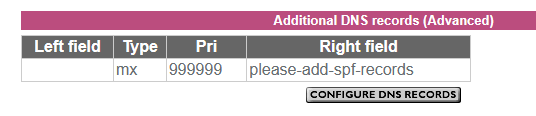
For the avoidance of doubt leave the left side blank, exactly as shown. It might take Plusnet's systems up to 6 hours to generate the SPF record.
If your email service is provided by one of the legacy vISP brands (for example MAAF) acquired over the years by Plusnet, similar options are not available to you.
Domain name registered and managed elsewhere (third party)
There are two scenarios here:
- Plusnet hosts the email service for the domain
- The domain forwards email to the native Plusnet email address
THESE ARE NOT THE SAME. Ideally email forwarding should be avoided as it brings about numerous complications - you should use the DOMAIN's email servers to received and send your domain email, not Plusnet's.
To configure SPF on a domain name registered elsewhere, you must use your domain name provider's DNS configuration tools to set up the applicable SPF record:
v=spf1 a mx include:_spf-internal.plus.net include:_spf-internal2.plus.net ~all

or

v=spf1 include:_spf-internal.madasafish.com include:_spf-internal2.madasafish.com include:_spf-external.madasafish.com -all
In another browser tab, login into the Plusnet user portal BEFORE clicking the fault & ticket links
Superusers are not staff, but they do have a direct line of communication into the business in order to raise issues, concerns and feedback from the community.
If this post helped, please click the Thumbs Up and if it fixed your issue, please click the This fixed my problem green button below.
Re: Sending to Gmail addresses
03-05-2024 5:29 PM
- Mark as New
- Bookmark
- Subscribe
- Subscribe to RSS Feed
- Highlight
- Report to Moderator
Hi,
Thanks for that summary, which is very helpful. However, I seem to have hit a snag with applying an SPF to my email.
My domain ("mydomain.com") is registered with Fasthosts, however I think I am right in saying that it is "hosted" by Plusnet - at any rate, I send and receive emails via Plusnet mail boxes using addresses like "[email protected]".
The DNS Nameservers for my domain (set in my Fasthosts dashboard) are set to:
- ns1.force9.net
- ns2.force9.net
I thought this was necessary in order to allow mail to be routed via Plusnet.
The problem is that with the nameservers not set to the Fasthosts default (ns1.livedns.co.uk) Fasthosts will not let me set Advanced DNS setting such as SPF. The implication is that in this case it is Plusnet that can set the SPF.
Is that correct, and if so, how do I get that done? If not correct, do you have any advice about getting the SPF set?
Thanks for your help, and sorry for displaying my technical ignorance.
David
Re: Sending to Gmail addresses
03-05-2024 5:48 PM - edited 03-05-2024 5:49 PM
- Mark as New
- Bookmark
- Subscribe
- Subscribe to RSS Feed
- Highlight
- Report to Moderator
@bathplug
however I think I am right in saying that it is "hosted" by Plusnet - at any rate,
That would appear to be the case as your nameservers are set to force9.
In which case the domain should be showing on your Plusnet account and you can proceed as the
Plusnet fully hosted and registered domain
section in @Townman s post above
Superusers are not staff, but they do have a direct line of communication into the business in order to raise issues, concerns and feedback from the community.
Re: Sending to Gmail addresses
03-05-2024 6:15 PM
- Mark as New
- Bookmark
- Subscribe
- Subscribe to RSS Feed
- Highlight
- Report to Moderator
OK thanks, that worked.
David
Re: Sending to Gmail addresses
03-05-2024 6:29 PM
- Mark as New
- Bookmark
- Subscribe
- Subscribe to RSS Feed
- Highlight
- Report to Moderator
It may take a few hours for the SPF record to appear on your DNS
Superusers are not staff, but they do have a direct line of communication into the business in order to raise issues, concerns and feedback from the community.
- Subscribe to RSS Feed
- Mark Topic as New
- Mark Topic as Read
- Float this Topic for Current User
- Bookmark
- Subscribe
- Printer Friendly Page