
Gmail issue
- Subscribe to RSS Feed
- Mark Topic as New
- Mark Topic as Read
- Float this Topic for Current User
- Bookmark
- Subscribe
- Printer Friendly Page
- Plusnet Community
- :
- Forum
- :
- Help with my Plusnet services
- :
- :
- Gmail issue

Gmail issue
22-10-2025 3:05 PM
- Mark as New
- Bookmark
- Subscribe
- Subscribe to RSS Feed
- Highlight
- Report to Moderator
Every time I try and send an email to a Gmail address, the server rejects it and I cannot figure out why it should be rejecting the email. Not even remotely anything like a spam email. Not sure how to resolve the issue as it is very annoying!

Re: Gmail issue
22-10-2025 3:07 PM
- Mark as New
- Bookmark
- Subscribe
- Subscribe to RSS Feed
- Highlight
- Report to Moderator
@Surfer Which server, what is the rejection message?
Re: Gmail issue
22-10-2025 3:29 PM
- Mark as New
- Bookmark
- Subscribe
- Subscribe to RSS Feed
- Highlight
- Report to Moderator
Not sure if this helps, but message states;
Reason: A message that you sent to the following recipient could not be delivered due to a permanent error. ** The remote server ?? responded with: ** [email protected] ??:?? This message was created automatically by mail delivery software on the server
Re: Gmail issue
22-10-2025 3:32 PM
- Mark as New
- Bookmark
- Subscribe
- Subscribe to RSS Feed
- Highlight
- Report to Moderator
No error code? There usually is one.


Re: Gmail issue
22-10-2025 4:27 PM
- Mark as New
- Bookmark
- Subscribe
- Subscribe to RSS Feed
- Highlight
- Report to Moderator
The detail is usually in the attachment.
In another browser tab, login into the Plusnet user portal BEFORE clicking the fault & ticket links
Superusers are not staff, but they do have a direct line of communication into the business in order to raise issues, concerns and feedback from the community.
If this post helped, please click the Thumbs Up and if it fixed your issue, please click the This fixed my problem green button below.
Re: Gmail issue
22-10-2025 5:11 PM
- Mark as New
- Bookmark
- Subscribe
- Subscribe to RSS Feed
- Highlight
- Report to Moderator
I checked and found this; Diagnostic-Code: smtp; 550-5.7.26 Your email has been blocked because the sender is unauthenticated. I have no issue sending email to any other adddress?
Still email and another issue has cropped up with my normal email. On some websites, to Login you need to enter your email address and then an email is sent with a code. You then enter this code to access the website. Unfortunately the email seems to be disappearing into the ethernet somewhere and I cannot access the website. Never had this issue previously and only started happening yesterday. Any advice? Thanks.
Re: Gmail issue
22-10-2025 5:26 PM
- Mark as New
- Bookmark
- Subscribe
- Subscribe to RSS Feed
- Highlight
- Report to Moderator
@Townman Is this Google reverting to previous behaviour? I thought that hole had been plugged.
I checked and found this; Diagnostic-Code: smtp; 550-5.7.26 Your email has been blocked because the sender is unauthenticated.
Re: Gmail issue
22-10-2025 5:26 PM
- Mark as New
- Bookmark
- Subscribe
- Subscribe to RSS Feed
- Highlight
- Report to Moderator
- Are you sending from @*.plus.com
- Is your SMTP service configuration using authentication
In another browser tab, login into the Plusnet user portal BEFORE clicking the fault & ticket links
Superusers are not staff, but they do have a direct line of communication into the business in order to raise issues, concerns and feedback from the community.
If this post helped, please click the Thumbs Up and if it fixed your issue, please click the This fixed my problem green button below.
Re: Gmail issue
22-10-2025 6:00 PM
- Mark as New
- Bookmark
- Subscribe
- Subscribe to RSS Feed
- Highlight
- Report to Moderator
On checking server setting:- My outgoing server SMTP requires authentication. I have selected "use same setting as incoming email server".
Re: Gmail issue
22-10-2025 6:20 PM
- Mark as New
- Bookmark
- Subscribe
- Subscribe to RSS Feed
- Highlight
- Report to Moderator
That sounds OK. Just to check, I have sent my Gmail account a message. Checked after 5 minutes, and it hadn't got there, but no rejection notification - yet.

Re: Gmail issue
22-10-2025 6:29 PM
- Mark as New
- Bookmark
- Subscribe
- Subscribe to RSS Feed
- Highlight
- Report to Moderator
Re: Gmail issue
22-10-2025 6:34 PM
- Mark as New
- Bookmark
- Subscribe
- Subscribe to RSS Feed
- Highlight
- Report to Moderator
I answered (2) but not sure about (1)? I use my own email via plus.bet
Re: Gmail issue
22-10-2025 6:38 PM
- Mark as New
- Bookmark
- Subscribe
- Subscribe to RSS Feed
- Highlight
- Report to Moderator
That is the issue then. Read and digest … your @youremailaddress.co.uk must have a SPF configuration which designates Plusnet’s SMTP servers to be an approved sender for your address.
Mitigating email delivery failures (notably Gmail)
Many users are reporting challenging issues in sending emails to some of the big email players. Some of those providers (notably Gmail, but only in respect of their free email accounts) have mandated the SPF & DKIM non-mandatory RFCs on other email providers, such as Plusnet. This can bring about significant difficulty when attempting to send emails using the various Plusnet and vISP legacy email services.
How you mitigate Google's behaviour very much depends on how you send your emails via Plusnet's SMTP servers and which Plusnet vISP email brands you use.
- A Plusnet email account or a legacy brand (for example MAAF) email account
- [email protected] (native Plusnet email address)
- [email protected] which is registered and hosted by Plusnet (or MAAF)
- [email protected] which is registered elsewhere and hosted by Plusnet
- [email protected] which is hosted elsewhere which forwards mail to your Plusnet (or MAAF) mailbox
The vISP email brands have different level of mitigation capability - for some, the only practical solution might be to migrate your email hosting elsewhere.
Native Plusnet email address
If a user sends email using a from address of [email protected] then DKIM signing will be applied to the email automatically (and pass Gmail's imposed restrictions) if the SMTP server is configured to require authentication. Somewhat unhelpfully, Plusnet's email setup guide suggests that such authentication is NOT required if connecting over a Plusnet connection. Whilst technically true, operational complications can occur and it is much tidier to just enable authentication with the "use the same account settings as the incoming server" option.
Your own domain
If you send from your own domain name, then DKIM signing is not available and you will need to configure SPF instead. How to do this depends on where your domain is hosted - by Plusnet or by third party.
Plusnet fully hosted and registered domain
For Plusnet brand registered and managed domains, SPF configuration is facilitated by the addition of a TXT record in the domain's DNS settings. Plusnet's DNS configuration tool for hosted domains does not permit the creation of TXT records. However, there is an unsupported "facilitation" which will create an SPF record for a hosted domain.
On the basis that your account ALREADY has a hosted domain:
- Log into the user portal
- Go to Manage Account
- Manage Your Domains (Manage your domains link)
- Configure domain name
- Create an "Additional DNS records (Advanced)" as follows...
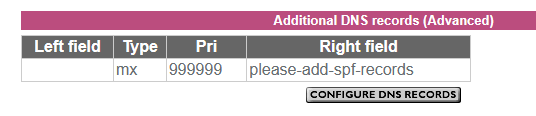
For the avoidance of doubt leave the left side blank, exactly as shown. It might take Plusnet's systems up to 6 hours to generate the SPF record.
If your email service is provided by one of the legacy vISP brands (for example MAAF) acquired over the years by Plusnet, similar options are not available to you.
Domain name registered and managed elsewhere (third party)
There are two scenarios here:
- Plusnet hosts the email service for the domain
- The domain forwards email to the native Plusnet email address
THESE ARE NOT THE SAME. Ideally email forwarding should be avoided as it brings about numerous complications - you should use the DOMAIN's email servers to received and send your domain email, not Plusnet's.
To configure SPF on a domain name registered elsewhere, you must use your domain name provider's DNS configuration tools to set up the applicable SPF record:
v=spf1 a mx include:_spf-internal.plus.net include:_spf-internal2.plus.net ~all

or

v=spf1 include:_spf-internal.madasafish.com include:_spf-internal2.madasafish.com include:_spf-external.madasafish.com -all
In another browser tab, login into the Plusnet user portal BEFORE clicking the fault & ticket links
Superusers are not staff, but they do have a direct line of communication into the business in order to raise issues, concerns and feedback from the community.
If this post helped, please click the Thumbs Up and if it fixed your issue, please click the This fixed my problem green button below.
Re: Gmail issue
22-10-2025 6:40 PM - edited 22-10-2025 6:41 PM
- Mark as New
- Bookmark
- Subscribe
- Subscribe to RSS Feed
- Highlight
- Report to Moderator
You mean you have your own domain name ?
Does the domain have an SPF record which specifies the Plusnet servers as permitted senders ?
Edit: @Townman gave more information
Superusers are not staff, but they do have a direct line of communication into the business in order to raise issues, concerns and feedback from the community.
Re: Gmail issue
22-10-2025 7:25 PM
- Mark as New
- Bookmark
- Subscribe
- Subscribe to RSS Feed
- Highlight
- Report to Moderator
I will read through it again tomorrow morning to see if any starts to make any sense. Thanks.
- Subscribe to RSS Feed
- Mark Topic as New
- Mark Topic as Read
- Float this Topic for Current User
- Bookmark
- Subscribe
- Printer Friendly Page