
Help with raising minimum speeds
- Subscribe to RSS Feed
- Mark Topic as New
- Mark Topic as Read
- Float this Topic for Current User
- Bookmark
- Subscribe
- Printer Friendly Page
- Plusnet Community
- :
- Forum
- :
- Help with my Plusnet services
- :
- Broadband
- :
- Help with raising minimum speeds

Re: Help with raising minimum speeds
04-04-2025 5:42 PM
- Mark as New
- Bookmark
- Subscribe
- Subscribe to RSS Feed
- Highlight
- Report to Moderator
Given that your Hub is receiving good speeds, I cannot see what good contacting PN will do.

Re: Help with raising minimum speeds
04-04-2025 6:23 PM
- Mark as New
- Bookmark
- Subscribe
- Subscribe to RSS Feed
- Highlight
- Report to Moderator
Hi there, this is the result from fast

Yes, it confirms on the hub page that no other devices are connected.
I didn't turn the wifi adaptor off, but I've just run it again with the wifi setting off and its returned a similar result
Re: Help with raising minimum speeds
04-04-2025 6:23 PM
- Mark as New
- Bookmark
- Subscribe
- Subscribe to RSS Feed
- Highlight
- Report to Moderator
Okay, that's not positive. What are my options here then?


Re: Help with raising minimum speeds
04-04-2025 6:50 PM - edited 04-04-2025 6:50 PM
- Mark as New
- Bookmark
- Subscribe
- Subscribe to RSS Feed
- Highlight
- Report to Moderator
I appreciate this issue is frustrating.
In an attempt to see where the issue can you try a wireless speed test? (sorry should have asked before)
What is the model of your laptop?
Knowing the Network Interface make would be helpful, PC running windows?
Windows key + R enter cmd click ok
At C:/Users/yourusername> wmic NIC get Name, speed
Are wireless devices connected directly to the Hub have reduced speeds?
Superusers are not staff, but they do have a direct line of communication into the business in order to raise issues, concerns and feedback from the community.
Re: Help with raising minimum speeds
04-04-2025 7:09 PM
- Mark as New
- Bookmark
- Subscribe
- Subscribe to RSS Feed
- Highlight
- Report to Moderator
Hi, I'm just heading out for the evening so I'll try that tomorrow,
thanks

Re: Help with raising minimum speeds
05-04-2025 10:34 AM
- Mark as New
- Bookmark
- Subscribe
- Subscribe to RSS Feed
- Highlight
- Report to Moderator
Hi @cg1996 I tried calling you noting there was no answer, I'm sorry to hear of the issues with your broadband speeds.
I have ran a test of the line and it hasn't detected any faults, can I ask, are you using our Plusnet router? As previously mention by other users, the stats are looking good so I'm thinking the router may be the culprit in this instance.
I have no issues with sending out a new hub to you, however, there is a postage fee of £6.99 to make you aware before I can send that out to you.
Look forward to hearing from you soon




Re: Help with raising minimum speeds
05-04-2025 11:31 AM
- Mark as New
- Bookmark
- Subscribe
- Subscribe to RSS Feed
- Highlight
- Report to Moderator
Hi all,
Thank you for the response.
I'm not sure I want to spend any more money resolving this issue so I'd like to exhaust all avenues first.
This morning, I ran a speed test off my phone which came out with 50mbps. Excitedly, I've booted up my PC and run another test with these results

Its a massive improvement but still not what I want it to be. I ran another speed test off my phone after turning on my PC and the results dropped to a similar level to the screenshot above. Maybe my (old) powerline adapters are causing this issue. I'm going to borrow a different set today and test them out to see if the results differ.
Re: Help with raising minimum speeds
06-04-2025 10:31 AM
- Mark as New
- Bookmark
- Subscribe
- Subscribe to RSS Feed
- Highlight
- Report to Moderator
@cg1996, as others have commented, this is a strange case. Your speed to the router is excellent, but your devices are not seeing that - so something is limiting the achievable speed even though your broadband is capable of more.
I also see that the latency on your speed tests seems rather high.
To eliminate as many causes as possible (which include powerline adapters, bad cables, wifi interference, etc.) it is best to test with a a ethernet cable directly connected to the router, with no other devices connected and wifi disabled. Since You appear to have done that (might be worth rechecking?), then other causes could include:
- a dodgy speedtest (something in your path to the test server) - try other speedtests such as cloudflare-speedtest
- packet loss (cloudflare will report that),
- Have you tried using a VPN - that can change the route that is used, and if the speedtest results are better it could indicate a bottleneck in Plusnet/BT's infrastucture
- do you have a static IP address? - static IPs use a different path through Plusnet's systems
- MTU - this is often misunderstood, but can cause packets to be split and often they are not reassembled correctly resulting in packet loss for some traffic. temporarily reducing it to say 1280 could eliminate that as a cause
- something else!
Re: Help with raising minimum speeds
06-04-2025 5:05 PM
- Mark as New
- Bookmark
- Subscribe
- Subscribe to RSS Feed
- Highlight
- Report to Moderator
Quickest & cheapest way to rule out the router would be to pick up another from your local Facebook Marketplace. Even an older Hub One or the BT HH5 version would suffice to rule the router out. The BT Smart Hub/HH6 would also do the job. You should be able to pick something up for peanuts & always useful to have a spare.
Re: Help with raising minimum speeds
06-04-2025 9:27 PM
- Mark as New
- Bookmark
- Subscribe
- Subscribe to RSS Feed
- Highlight
- Report to Moderator
Hello all, hope you all had a lovely weekend.
I changed powerline adaptors today with little success.
I ran another speedtest on the router this evening using the laptop (direct ethernet cable connection) with these results.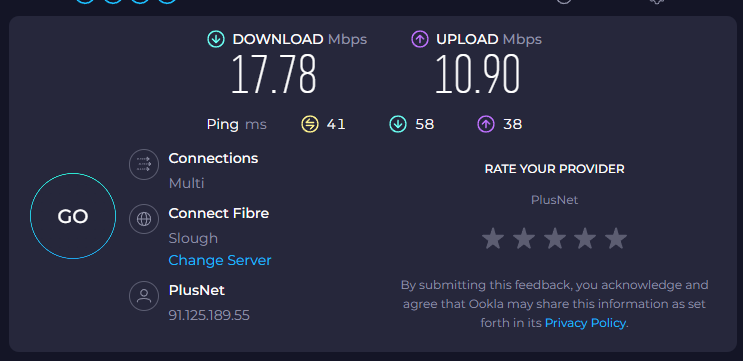
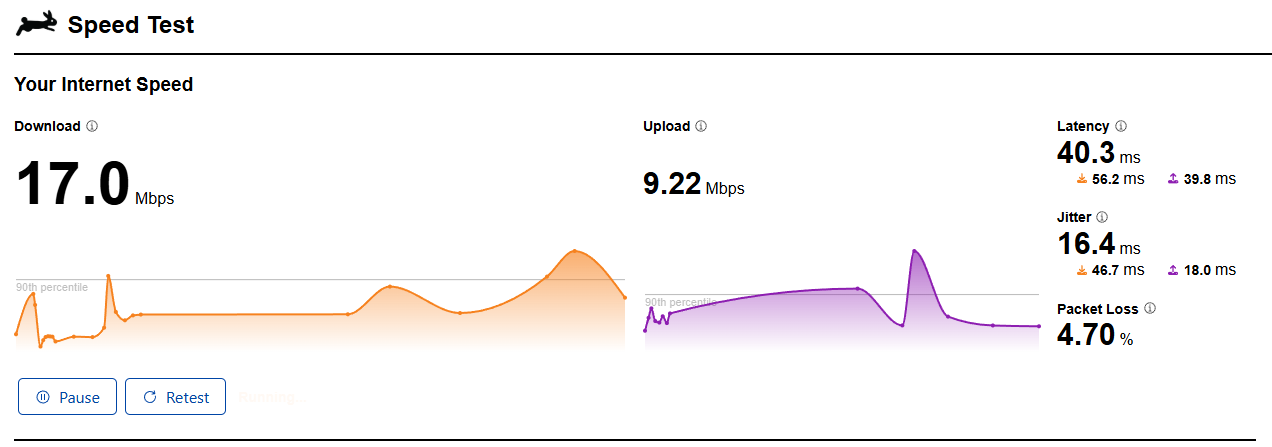
I also ran on the other website that was provided.
All the VPNs I found through googling wanted payment/subscriptions to use which I don't particular want to explore haha.
After a bit of googling, I have worked out that I have a static IP. Let me know if you want me to provide it.
Packet loss and MTU, still a bit stumped on, but that's the current situation.
I do have another nugget of information though. My neighbour two doors down (who is with BT) has told me today that he is also experiencing awful internet speeds at the moment. His started about three weeks ago (same as mine) so I'm wondering if its related in any way?
Thanks again.
Re: Help with raising minimum speeds
07-04-2025 9:16 AM - edited 07-04-2025 9:21 AM
- Mark as New
- Bookmark
- Subscribe
- Subscribe to RSS Feed
- Highlight
- Report to Moderator
From your cloudflare results there is some packet loss which shouldn't be there. Both test results show higher latency than I'd expect.
It could well be the case that you are on what is called a "hot VLAN" which is just a connection within the BT network that is a bit overloaded. That would likely also affect your neighbour as Plusnet and BT use the same infrastructure.
Since you are on a static IP that goes through a different path to the internet to dynamic IPs (such as your BT neighbour will be using) the bottleneck is likely before it routes through Plusnet - so quite possibly at the cabinet.
You could ask Plusnet to check for a hot VLAN - some staff may know what you're asking. At the very least keep up the pressure to get the issue looked at in detail, as if you only look at sync speed there is no problem.
Edit: you should also ask your neighbour to report a fault with BT if they haven't already - that may double your chance of a fix as fixing one may fix both.
Re: Help with raising minimum speeds
07-04-2025 4:56 PM
- Mark as New
- Bookmark
- Subscribe
- Subscribe to RSS Feed
- Highlight
- Report to Moderator
Okay, I'll do that. Hopefully that will yield some results.
I've noticed today that our server location has changed, our internet speed seems a bit faster today. Could that be plusnet changing location to try and fix my issue, or is it coincidental?
Re: Help with raising minimum speeds
07-04-2025 5:03 PM
- Mark as New
- Bookmark
- Subscribe
- Subscribe to RSS Feed
- Highlight
- Report to Moderator
That 'server change' you have noticed is by the speed test site (Ookla) and not by PN.
Re: Help with raising minimum speeds
07-04-2025 5:27 PM
- Mark as New
- Bookmark
- Subscribe
- Subscribe to RSS Feed
- Highlight
- Report to Moderator
Oh, I see.
Whoops! My bad!
Re: Help with raising minimum speeds
07-04-2025 5:38 PM
- Mark as New
- Bookmark
- Subscribe
- Subscribe to RSS Feed
- Highlight
- Report to Moderator
However, that could indicate something has changed in the network - ookla and most other speed tests choose which server to test by checking the latency to a number of available servers, and then uses the one with lowest latency so that it is testing your connection rather than the slowest bit of the network.
So, the server that is chosen will vary depending on network activity, but also on the network topology - so if routing is changed within BT's network that could cause a different server to be used.
- Subscribe to RSS Feed
- Mark Topic as New
- Mark Topic as Read
- Float this Topic for Current User
- Bookmark
- Subscribe
- Printer Friendly Page
- Plusnet Community
- :
- Forum
- :
- Help with my Plusnet services
- :
- Broadband
- :
- Help with raising minimum speeds