
Flashing Orange Light on Router
- Subscribe to RSS Feed
- Mark Topic as New
- Mark Topic as Read
- Float this Topic for Current User
- Bookmark
- Subscribe
- Printer Friendly Page
- Plusnet Community
- :
- Forum
- :
- Help with my Plusnet services
- :
- Broadband
- :
- Re: Flashing Orange Light on Router

Flashing Orange Light on Router
07-06-2023 8:06 AM
- Mark as New
- Bookmark
- Subscribe
- Subscribe to RSS Feed
- Highlight
- Report to Moderator
Hello all,
I am a new customer, I moved address on the 19th May and ordered plus net fibre broadband on the 20th. It was supposed to go live on the 5th June, and I got the message to plug everything in etc, but I can't get the router to stop flashing orange.
As per Plusnet's help page, we took the steps of doing a factory reset.
Is it possible the broadband just hasn't been activated yet? We have tradesmen coming to the house on Saturday and we need broadband working for their visit so they can set certain things up.
Thanks

Re: Flashing Orange Light on Router
07-06-2023 8:16 AM
- Mark as New
- Bookmark
- Subscribe
- Subscribe to RSS Feed
- Highlight
- Report to Moderator
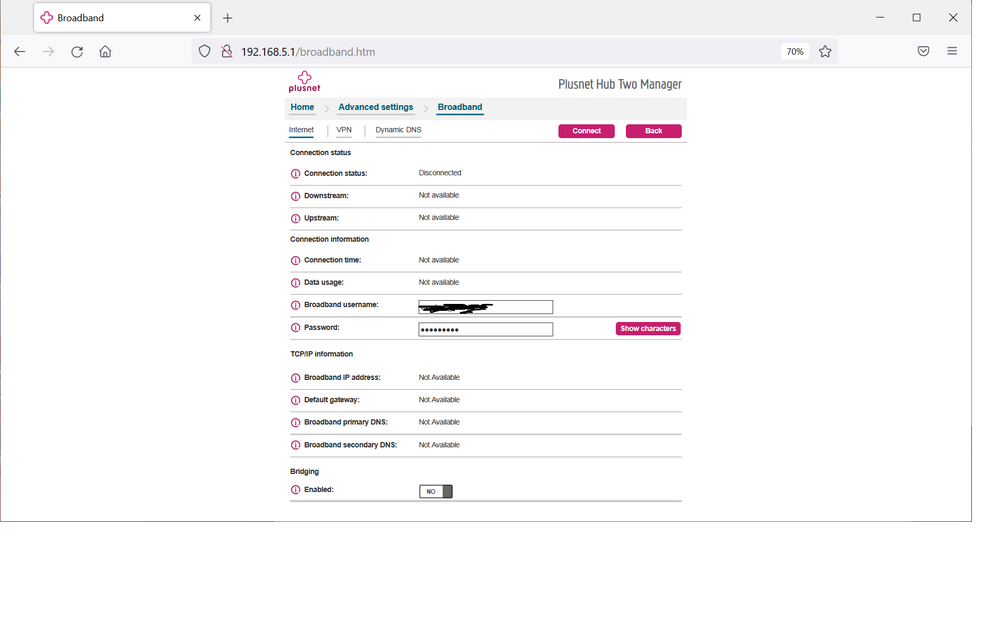
@Airbornecon Welcome to the forum. I assume you have posted on the wrong board and you actually have Fibre To The Cabinet and not Full Fibre? Anyway, I suggest you check the username and password on the Hub is yours, and not '[email protected]'.
Re: Flashing Orange Light on Router
07-06-2023 8:25 AM
- Mark as New
- Bookmark
- Subscribe
- Subscribe to RSS Feed
- Highlight
- Report to Moderator
Apologies, I may have posted in the wrong sub, it's "Unlimited Fibre 18 to 28mb"
Re: Flashing Orange Light on Router
07-06-2023 8:35 AM
- Mark as New
- Bookmark
- Subscribe
- Subscribe to RSS Feed
- Highlight
- Report to Moderator
No problem - I'll get it moved. Have you checked as I advised above?


Re: Flashing Orange Light on Router
07-06-2023 8:38 AM
- Mark as New
- Bookmark
- Subscribe
- Subscribe to RSS Feed
- Highlight
- Report to Moderator
Moderators Note
This topic has been moved from Full Fibre to Broadband
If it helped click the thumb
If it fixed it click 'This fixed my problem'
Re: Flashing Orange Light on Router
07-06-2023 8:39 AM
- Mark as New
- Bookmark
- Subscribe
- Subscribe to RSS Feed
- Highlight
- Report to Moderator
Just got to work but will check as soon as I get home. I take it I just connect to the router and go to the settings page (IP) to change it?
Re: Flashing Orange Light on Router
07-06-2023 8:42 AM - edited 07-06-2023 8:44 AM
- Mark as New
- Bookmark
- Subscribe
- Subscribe to RSS Feed
- Highlight
- Report to Moderator
Not quite. Log into the Hub and navigate to this page:
Re: Flashing Orange Light on Router
07-06-2023 8:57 AM
- Mark as New
- Bookmark
- Subscribe
- Subscribe to RSS Feed
- Highlight
- Report to Moderator
Also is the password the router password I’ve been provided? Cheers


Re: Flashing Orange Light on Router
07-06-2023 9:03 AM
- Mark as New
- Bookmark
- Subscribe
- Subscribe to RSS Feed
- Highlight
- Report to Moderator
There should be no need to change the username manually now. When the router was flashing orange , there was no DSL sync and thus no internet connection was possible. Now that the router has connected, it will automatically configure itself with the correct username/password.
Superusers are not staff, but they do have a direct line of communication into the business in order to raise issues, concerns and feedback from the community.
Re: Flashing Orange Light on Router
07-06-2023 9:12 AM
- Mark as New
- Bookmark
- Subscribe
- Subscribe to RSS Feed
- Highlight
- Report to Moderator
@Airbornecon wrote:
Sorry to be a pain but where do I find my plusnet email to use? I’ve just looked over my emails from plusnet and it always references my @outlook email I used to sign up.
Also is the password the router password I’ve been provided? Cheers
The username and password are those you agreed with Plusnet, your email doesn't come into it at all. The username should be in the format '<yourusername>@plusdsl.net' - without the '.
@MisterW 's comment has mage me rethink - maybe your connection is missing something, as the flashing orange, as he rightly says, indicate a lack of DSL connection.
Re: Flashing Orange Light on Router
07-06-2023 9:17 AM
- Mark as New
- Bookmark
- Subscribe
- Subscribe to RSS Feed
- Highlight
- Report to Moderator
Now that the router has connected
Oops , I read 'now got to work' as 'now got it to work'.
Superusers are not staff, but they do have a direct line of communication into the business in order to raise issues, concerns and feedback from the community.
Re: Flashing Orange Light on Router
07-06-2023 10:02 AM
- Mark as New
- Bookmark
- Subscribe
- Subscribe to RSS Feed
- Highlight
- Report to Moderator
Re: Flashing Orange Light on Router
07-06-2023 10:07 AM
- Mark as New
- Bookmark
- Subscribe
- Subscribe to RSS Feed
- Highlight
- Report to Moderator
Flashing Orange means that there is no DSL(broadband) signal getting to the router. This is most likely to be a problem with the installation performed by Openreach engineers.
However, just to confirm. Is your router connected to the BT Master socket ? and is it the type with 2 sockets, one for phone and one for DSL ?
Superusers are not staff, but they do have a direct line of communication into the business in order to raise issues, concerns and feedback from the community.
Re: Flashing Orange Light on Router
07-06-2023 10:11 AM
- Mark as New
- Bookmark
- Subscribe
- Subscribe to RSS Feed
- Highlight
- Report to Moderator
I was just about to ask that question, and also suggest all connections were fully seated. Hopefully when the OP gets back from work, we will learn more.
Re: Flashing Orange Light on Router
07-06-2023 10:14 AM
- Mark as New
- Bookmark
- Subscribe
- Subscribe to RSS Feed
- Highlight
- Report to Moderator
@Airbornecon wrote:
Am I better off ringing Plusnet today then, I am assuming it’s an issue on their end?
That is an idea, although as they have advised that you are live, it may not be.
- Subscribe to RSS Feed
- Mark Topic as New
- Mark Topic as Read
- Float this Topic for Current User
- Bookmark
- Subscribe
- Printer Friendly Page
- Plusnet Community
- :
- Forum
- :
- Help with my Plusnet services
- :
- Broadband
- :
- Re: Flashing Orange Light on Router