
Broadband Speed Faults: How to diagnose?
- Subscribe to RSS Feed
- Mark as New
- Mark as Read
- Bookmark
- Subscribe
- Printer Friendly Page
- Report to Moderator
- Plusnet Community
- :
- Plusnet Blogs
- :
- Broadband Speed Faults: How to diagnose?
Broadband Speed Faults: How to diagnose?
One of the more common questions that we are asked by our customers is “Why is my Broadband slow?” Which in itself is, of course, a perfectly reasonable question. Unfortunately, finding the answer isn’t always quite as easy! We have customers on fixed rate products and max products and the diagnosis on both is quite different. This is predominantly owing to the distinct lack of useful diagnostics available for us on the fixed rate products, but fortunately, on the max (upto 8Mbps) services, there are considerably more diagnostic tools available that help us to diagnose speed issues, as well as tools available for the customer. I’ll be focusing on this product in this posting as at least two thirds of our customers are on the upto 8Mbps product with us. So where do we begin? I think it’s a sensible starting point to set out clear expectations when dealing with speed issues. The first and most fundamental point is that upto 8Mbps means just that. It is not guaranteed. Broadband is extremely dependent on your distance from your local telephone exchange. This is true for signal issues and in extreme cases may result in receiving a Broadband service impossible. Maximum obtainable speeds are dependent on this also. The further you are from the exchange, the poorer quality a Broadband signal you will be able to receive from said exchange. The better the quality of signal, the greater will be the maximum expected throughput speeds, although this also depends on how “busy” your local exchange is, but that’s another issue we can delve into later. One of the most useful tools available to our customers is the BT Speedtester, which gives a reasonable amount of information about the limitations applied to the Broadband connection from a speed perspective. Please note, if you have a broadband speed fault you will need to complete two tests - once the first has completed please click 'further diagnostics' and fill in the details requested before completing the second test. If this is not completed our faults team will not have access to the results. The speed tester is still somewhat in its infancy so can be a little unreliable at busy times of the day. Here’s an example of a result from the Speedtester. 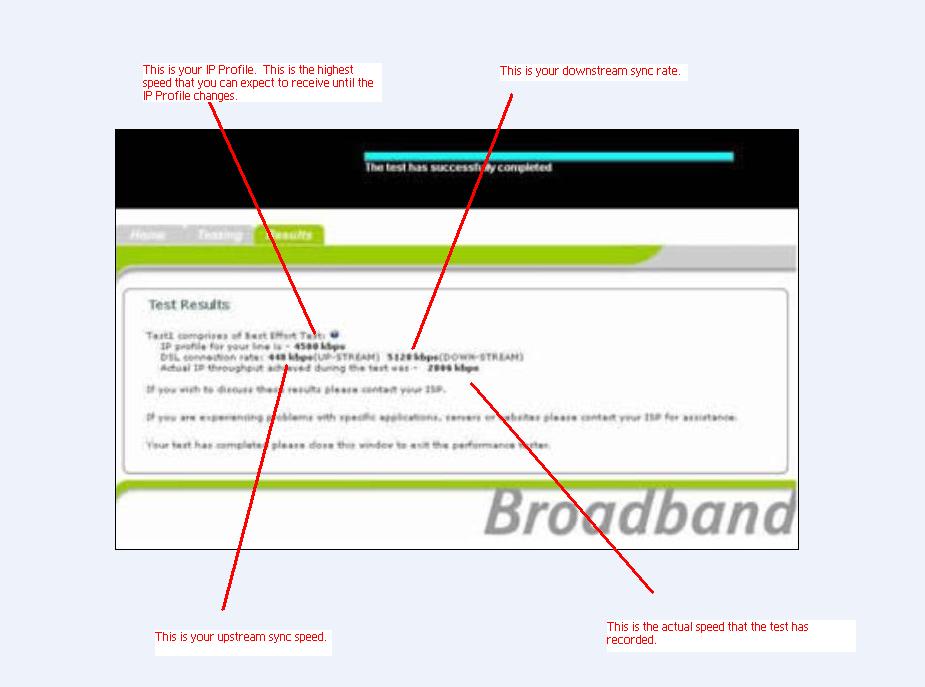 So, as you can see, you are presented with four main pieces of information. Your upstream and downstream synchronisation speeds (this is the speed at which your modem or router is connecting with the BT Exchange), your IP Profile and your actual throughput speed as recorded by the test. For the majority of speed faults, the upstream synchronisation speed can practically be ignored, unless it reports speeds significantly below 448Kbps. The IP Profile is the speed at which BT have restricted your connection to, as they believe that this is the fastest speed that you can receive whilst also receiving a stable connection. The IP Profile is the maximum speed that you will be able to get in a speed test. The downstream synchronisation speed is extremely important. This is the speed at which BT use to calculate your IP Profile. We have a table on our website which shows you’re the relevant synchronisation speeds versus the appropriate IP Profile speeds, which you can find here. You can also see your current profiled speed on our network, which is designed to mirror BTs IP Profile and is updated twice a day. See this here. Unfortunately the IP Profile is not updated on a real time basis. BT take your lowest downstream synchronisation speed (hence the importance of this as I mentioned earlier) over a three day period and then assign the appropriate IP Profile. Here’s where the problems can occur. Downstream line synchronisation can and does fluctuate. There are various factors that can cause line synchronisation to drop and fluctuate. Most commonly these factors can relate to faulty filtering, a suspect modem or router or poor internal wiring. The best setup for any Broadband connection is always to have your modem or router connected into a filter and then for your filter to be connected to your master socket, which is normally the first socket into your house from your road. It is also imperative that every used phone socket in your house has a filter attached, as failure to do this can cause interference between the analogue (normal voice phone) and digital (Broadband) signals. There are also additional factors that can come into play such as poor weather, exchange and line related problems and even things like street lights, central heating and Christmas lights! If your modem or router does drop synchronisation and it regains synchronisation at a lower level, then BT will change your IP Profile speed to reflect this change in reported synchronisation speed within 75 minutes. In extreme cases, this can cause the IP Profile to be set as low as 135Kbps when a resynchronisation event equal to or lower than 160Kbps happens. This does happen to the best of us, including myself, who lives on the same street as his exchange! BT do have in place something they refer to as “Blip Logic”, which is supposed to mean that they will only force a change in profile speed should there be two resynchronisation events lower than the current profiled speed. Unfortunately, this does not always seem to be the case. So, as you can imagine, it is always fundamentally important to ensure that you setup ensures the highest level of signal, by connecting to your master socket (also known as the NTE5) as I outlined earlier. This will result in any potential resynchronisation events being less likely, thus increasing the chances of maintaining a sustained speed at the highest possible level. One of the other factors when it comes down to diagnosing Broadband speed problems is a further connection attribute of the noise margin. Because with Max, BT push the limits of your connection as far as it can go, they will try to attain the highest synchronisation speed with a target noise margin of 6dB. For the majoirty of lines, this will work absolutely fine, especially for those closer to the BT Exchange. However, some lines, especially the longers ones, will experience more "noise". This can be caused by a number of factors on the line, be it poor quality telephone wiring (external), street lighting, transmitters, interference from electronic devices (pylons) and so on. BT will then assign a higher noise margin to the Broadband connection. For every 3dB increase in noise margin, this will result in approximately an 800Kbps reduction in synchronisation speed. Also, this is often one of BTs first measures when trying to fix an intermittent fault. So if we raise a fault to BT for an intermittent connection, they will often raise the target noise margin by 3dB to increase stability on the line at the detriment of speed. So this is also another thing to consider when trying to work out what kinds of speeds you *could* be receiving. So, obviously so far I’ve covered what our customers are able to do and see and the suggested actions and precautions that can be made to cope with the perceived flaws of the service and what information is available to them. We also have our own diagnostic tools available to help to troubleshoot this kind of problems and give a more detailed level of information to help our customers understand the cause of the problems that they experience. In the next part of this posting, I’d like to give you an insight into the systems that we use and the information that we gain from these. We predominantly use systems called “Actuate” and “Woosh”. I’ll start by showing you a standard report from Actuate and the information that we can see from this.
 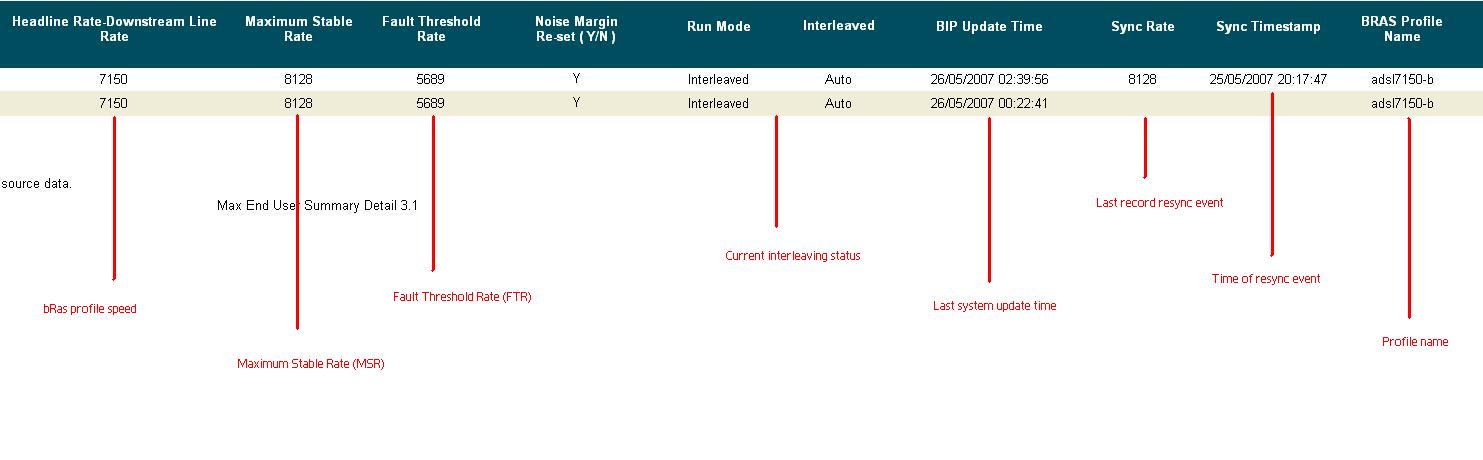 The main points of interest that I would usually take from these reports are generally the current profile, the synchronisation rate and the dates and times of resynchronisation rates. From these we are able to easily point at the relevant resynchronisation events and show a customer at exactly when their modem or router suffered a blip and the speed at which the resynchronisation occurred. What is also useful is when there are a large number of “blips” which would often point towards an issue with internal wiring or poor hardware, which means that we are then able to suggest various troubleshooting ideas to our customers. What is also of interest is the interleaving state. Interleaving is a function on the max product that increases the stability on a line, but increases the latency of a connection, which is generally of interest to our customers that enjoy online gaming. This allows us to see if BT have removed interleaving from a line once we have raised an order for them to do so. The other main diagnostic tool that we use is one called “Woosh”, which is essentially a suite of various different tests. The ones I would predominantly use are the “DSL Status Check” and a “One Shot Check”. A lot of the information is repeated, but various tests have their own uses. Here’s a DSL Status Check:
 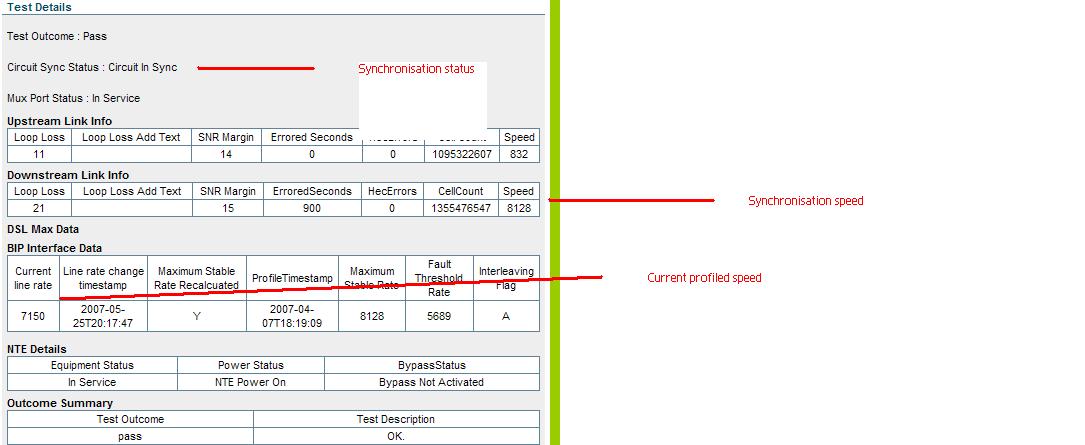 From my point of view, I tend to use this check to show the current synchronisation speed when checking against the last report resynchronisation event as reported in Actuate. This is useful as we can then inform the customer of what speeds they should expect to receive should this level of synchronisation be maintained for a period of 3 days or more. The One Shot Check is by far a more conclusive all-round test (no screenshots this time I’m afraid as it contains a level of sensitive information), which can be used to diagnose intermittent connection issues, as well as having a use when looking into speed related faults. Whilst it does generally give similar information to that of the DSL Status Check, it does also show how long the current connection has been maintained for, which coupled with our RADIUS (authentication) server allows us to see the length of connection and the current synchronisation speed. It also shows us the number of reconnections in a given time frame. An intermittent connection is likely to have a few low resynchronisation events, thus causing the IP Profile speed to be low. As such we can suggest internal wiring and hardware checks, which will hopefully result in increased stability and as such, an increase in speed. Unfortunately, the one thing that we’re not able to gain a massive amount of information on is exchange contention. Each exchange has a finite amount of bandwidth which Broadband users are able to use simultaneously. For busy exchanges there can be a noticeable slow down during peak times of the day. Whilst we are given a RAG (Red, Amber, Green) report for all of BTs exchanges, this is merely a guideline and not a definitive answer. Our systems of traffic management also need to be considered. Whilst these usually would not impact pure browsing speeds. However, on our Broadband Your Way product line, where our customers have requested a fixed usage amount (as opposed to Pay As You Go), speeds are restricted to 128Kbps. There are also potential speed restrictions on legacy Broadband Plus and Premier products, which can result in speeds being restricted should the usage allocations be exceeded. This should be considered when looking into slow speed results from both our and the customers end. Well, that’s pretty much all I could possibly ever write on this subject, but should there be any further developments on the Broadband services that we provide, I shall endeavour to update further! For an even more definitive guide to the Broadband Max service then please do read the guide on our portal.
- « Previous
-
- 1
- 2
- Next »
You must be a registered user to add a comment here. If you've already registered, please log in. If you haven't registered yet, please register and log in.