
Email issues?
- Subscribe to RSS Feed
- Mark Topic as New
- Mark Topic as Read
- Float this Topic for Current User
- Bookmark
- Subscribe
- Printer Friendly Page
- Plusnet Community
- :
- Forum
- :
- Help with my Plusnet services
- :
- :
- Email issues?

Email issues?
27-08-2025 11:10 AM
- Mark as New
- Bookmark
- Subscribe
- Subscribe to RSS Feed
- Highlight
- Report to Moderator
Hi all,
I have a domain & associated email which was registered many moons ago and eventually has ended up with Plusnet.
Whilst everything was working fine, recently I am having issues with the email, I am unable to add the email address to my new device, keeps asking for the password. The password has been verified online and is working.
Similarly, I am being prompted persistently for password on other devices for the same email address hosted with Plusnet now that have been working fine.
Is something changed / going on? Anyone have any ideas?
R


Re: Email issues?
27-08-2025 2:31 PM
- Mark as New
- Bookmark
- Subscribe
- Subscribe to RSS Feed
- Highlight
- Report to Moderator
There were service issues earlier today, which were fixed fairly promptly.
Stating the mail service in question, how you are connecting would help community members to render assistance.
In another browser tab, login into the Plusnet user portal BEFORE clicking the fault & ticket links
Superusers are not staff, but they do have a direct line of communication into the business in order to raise issues, concerns and feedback from the community.
If this post helped, please click the Thumbs Up and if it fixed your issue, please click the This fixed my problem green button below.


Re: Email issues?
27-08-2025 4:12 PM
- Mark as New
- Bookmark
- Subscribe
- Subscribe to RSS Feed
- Highlight
- Report to Moderator
Thread moved from Everything Else to Email
Moderator and Customer
If this helped - select the Thumb
If it fixed it, help others - select 'This Fixed My Problem'
Re: Email issues?
30-08-2025 1:58 PM - edited 30-08-2025 2:02 PM
- Mark as New
- Bookmark
- Subscribe
- Subscribe to RSS Feed
- Highlight
- Report to Moderator
Hello All,
I have a weird problem sending email using a domain name hosted by Force9 (Plusnet) for the last 26-27 years.
My domain name is reallyremote.com
If my sender address in the outgoing email contains "reallyremote.com" after the @symbol - i'e outgoing email is
"reallyremote@reallyremote.com" I get the following error:-
"SMTP Error (550): Failed to set sender "reallyremote@reallyremote.com" (<reallyremote@reallyremote.com> sender domain rejected (blacklisted by local policy))."
If I set the outgoing email address to @reallyremote.f9.co.uk the SMTP server - relay.force9.net sends the email without issue. Authentication is the same in both cases. Incoming email to <mailbox name>@reallyremote.com works fine and I receive incoming email without issue.
I have a case with support that has been open for over a month and the support staff suggested I try this forum.
FYI - My domain is not blacklisted anywhere.
Does anybody have any ideas regarding a remedy?
Thanks and kind regards.
MrDavid
Re: Email issues?
30-08-2025 3:20 PM
- Mark as New
- Bookmark
- Subscribe
- Subscribe to RSS Feed
- Highlight
- Report to Moderator
Hello All,
Just some additional info.
I found a provider of SMTP services - turboSMTP <https://serversmtp.com>
I bought a package for 49.00 US Dollars plus 20% VAT which allows me and my family to send 50,000 email over the next year and allows me to use <mailbox name>@reallyremote.com as the sender.
So far so good. they asked that I add SPF and other records to DNS to make sure emails go without problem but I am not confident in doing so using the instructions contained in the following article:-
https://www.plus.net/help/archive/broadband/managing-dns-records/?supportarchive
I cannot even see all my DNS records using this interface. I used Nslookup.io on the web to see what records existed and I could see the DNS records for reallyremote.com but I could not edit/add the existing ones I need to add by following the support article.
I hope that this is of help to somebody that may be having the same problem.
MrDavid

Re: Email issues?
30-08-2025 4:54 PM
- Mark as New
- Bookmark
- Subscribe
- Subscribe to RSS Feed
- Highlight
- Report to Moderator
hey asked that I add SPF and other records to DNS to make sure emails go without problem but I am not confident in doing so using the instructions contained in the following article:-
@mrdavid911 I'm afraid you cant set SPF records for a Plusnet hosted domain.
Superusers are not staff, but they do have a direct line of communication into the business in order to raise issues, concerns and feedback from the community.
Re: Email issues?
30-08-2025 6:16 PM
- Mark as New
- Bookmark
- Subscribe
- Subscribe to RSS Feed
- Highlight
- Report to Moderator
Is this a Plusnet hosted domain or a domain redirected to the baked Force9 mail services? Give the description - domain name bout elsewhere - there ought to be DNS management elsewhere.
That being the case mail hosting ought to be elsewhere too.
If the redirect approach is what’s required, then one will need to get technical - here is soup to nuts on SPF for different scenarios…
Mitigating email delivery failures (notably Gmail)
Many users are reporting challenging issues in sending emails to some of the big email players. Some of those providers (notably Gmail, but only in respect of their free email accounts) have mandated the SPF & DKIM non-mandatory RFCs on other email providers, such as Plusnet. This can bring about significant difficulty when attempting to send emails using the various Plusnet and vISP legacy email services.
How you mitigate Google's behaviour very much depends on how you send your emails via Plusnet's SMTP servers and which Plusnet vISP email brands you use.
- A Plusnet email account or a legacy brand (for example MAAF) email account
- you@youraccount.plus.com (native Plusnet email address)
- you@yourdomain.co.uk which is registered and hosted by Plusnet (or MAAF)
- you@yourdomain.co.uk which is registered elsewhere and hosted by Plusnet
- you@yourdomain.co.uk which is hosted elsewhere which forwards mail to your Plusnet (or MAAF) mailbox
The vISP email brands have different level of mitigation capability - for some, the only practical solution might be to migrate your email hosting elsewhere.
Native Plusnet email address
If a user sends email using a from address of you@youraccount.plus.com then DKIM signing and SPF will be applied to the email automatically (and pass Gmail's imposed restrictions) if the SMTP server is configured to require authentication. Somewhat unhelpfully, Plusnet's email setup guide suggests that such authentication is NOT required if connecting over a Plusnet connection. Whilst technically true, operational complications can occur and it is much tidier to just enable authentication with the "use the same account settings as the incoming server" option.
Your own domain
If you send from your own domain name, then DKIM signing is not available and you will need to configure SPF instead. How to do this depends on where your domain is hosted - by Plusnet or by third party.
Plusnet fully hosted and registered domain
For Plusnet brand registered and managed domains, SPF configuration is facilitated by the addition of a TXT record in the domain's DNS settings. Plusnet's DNS configuration tool for hosted domains does not permit the creation of TXT records. However, there is an unsupported "facilitation" which will create an SPF record for a hosted domain.
On the basis that your account ALREADY has a hosted domain:
- Log into the user portal
- Go to Manage Account
- Manage Your Domains (Manage your domains link)
- Configure domain name
- Create an "Additional DNS records (Advanced)" as follows...
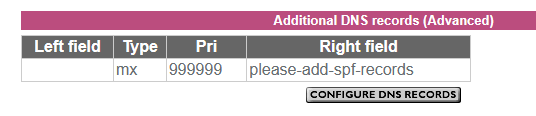
For the avoidance of doubt leave the left side blank, exactly as shown. It might take Plusnet's systems up to 6 hours to generate the SPF record.
If your email service is provided by one of the legacy vISP brands (for example MAAF) acquired over the years by Plusnet, similar options are not available to you.
Domain name registered and managed elsewhere (third party)
There are two scenarios here:
- Plusnet hosts the email service for the domain
- The domain forwards email to the native Plusnet email address
THESE ARE NOT THE SAME. Ideally email forwarding should be avoided as it brings about numerous complications - you should use the DOMAIN's email servers to received and send your domain email, not Plusnet's.
To configure SPF on a domain name registered elsewhere, you must use your domain name provider's DNS configuration tools to set up the applicable SPF record:
v=spf1 a mx include:_spf-internal.plus.net include:_spf-internal2.plus.net ~all

or

v=spf1 include:_spf-internal.madasafish.com include:_spf-internal2.madasafish.com include:_spf-external.madasafish.com -all
In another browser tab, login into the Plusnet user portal BEFORE clicking the fault & ticket links
Superusers are not staff, but they do have a direct line of communication into the business in order to raise issues, concerns and feedback from the community.
If this post helped, please click the Thumbs Up and if it fixed your issue, please click the This fixed my problem green button below.
Re: Email issues?
30-08-2025 7:01 PM - edited 30-08-2025 7:21 PM
- Mark as New
- Bookmark
- Subscribe
- Subscribe to RSS Feed
- Highlight
- Report to Moderator
Hello MisterW,
This is a domain owned by my wife. The registrar is Network Solutions.
This domain has always been hosted by Force9. The name servers for the domain are:-
NS1.FORCE9.NET & NS2.FORCE9.NET
i hope the this is the response you were looking for.
Kind regards,
MrDavid911
Re: Email issues?
30-08-2025 7:16 PM - edited 30-08-2025 7:18 PM
- Mark as New
- Bookmark
- Subscribe
- Subscribe to RSS Feed
- Highlight
- Report to Moderator
Hi Townman,
Thank you for confirming what I suspected.
I chose not to edit or add anything to the DNS records using instructions contained in the support article at the following link:-
https://www.plus.net/help/archive/broadband/managing-dns-records/?supportarchive
Kind regards,
MrDavid911
Re: Email issues?
01-09-2025 7:39 PM
- Mark as New
- Bookmark
- Subscribe
- Subscribe to RSS Feed
- Highlight
- Report to Moderator
Hi,
Sorry for the delay in responding.
I purchased a new iPad and was trying to add my account to that and it just kept coming back and asking for my password. In the end I gave up, not tried again.
Whilst trying to setup, I tested my iPhone which had the account already and whilst it was still there, it had not received any messages for a while. I pulled down to refresh and received the password prompt.
I ignored the messages on my iPhone and some time later tried to send a message to my hotmail account, it seemed to send but never got there. Hence my post here.
The domain was originally registered by freenetname.
Seems to be back up and running on my phone now, haven't tried to re-add to new iPad.
R

Re: Email issues?
01-09-2025 7:53 PM
- Mark as New
- Bookmark
- Subscribe
- Subscribe to RSS Feed
- Highlight
- Report to Moderator
@RRM iPads/phones, especially newer ones, are a right pain to set up for PN mail accounts. I succeeded on on an iPhone5 many years ago, but when it came to its replacement (an  I, and a couple of other long-time Apple product users gave it up as a bad job.
Not a big problem these days as I'm rarely that far away from my laptop, but if I was like many who use phones/tablets exclusively, I wouldn't be a happy bunny.
Re: Email issues?
01-09-2025 9:24 PM
- Mark as New
- Bookmark
- Subscribe
- Subscribe to RSS Feed
- Highlight
- Report to Moderator
Apple works like a dream - better than many clients at getting the right port / encryption without help.
What can happen is the application gets confused divining the impression that the configuration is wrong; what needs to to happen is “unloaded” and restart the mail application.
In another browser tab, login into the Plusnet user portal BEFORE clicking the fault & ticket links
Superusers are not staff, but they do have a direct line of communication into the business in order to raise issues, concerns and feedback from the community.
If this post helped, please click the Thumbs Up and if it fixed your issue, please click the This fixed my problem green button below.
Re: Email issues?
01-09-2025 9:34 PM
- Mark as New
- Bookmark
- Subscribe
- Subscribe to RSS Feed
- Highlight
- Report to Moderator
Fair enough, @Townman - I might try again, but it isn't priority for me. Maybe they tweaked things after my failed attempts, but those attempts foxed people had been using Apple kit for quite a while before I tried.
- Subscribe to RSS Feed
- Mark Topic as New
- Mark Topic as Read
- Float this Topic for Current User
- Bookmark
- Subscribe
- Printer Friendly Page