
using my own TP-Link 2100 router
- Subscribe to RSS Feed
- Mark Topic as New
- Mark Topic as Read
- Float this Topic for Current User
- Bookmark
- Subscribe
- Printer Friendly Page
- Plusnet Community
- :
- Forum
- :
- Help with my Plusnet services
- :
- Broadband
- :
- using my own TP-Link 2100 router

Re: using my own TP-Link 2100 router
08-07-2023 10:30 PM
- Mark as New
- Bookmark
- Subscribe
- Subscribe to RSS Feed
- Highlight
- Report to Moderator
just added the router info as well, in case that's of use


Re: using my own TP-Link 2100 router
09-07-2023 12:14 AM
- Mark as New
- Bookmark
- Subscribe
- Subscribe to RSS Feed
- Highlight
- Report to Moderator
Something putting out constant RFI that constantly wound be a bit odd, but that is what the graphs suggest so far.
In another browser tab, login into the Plusnet user portal BEFORE clicking the fault & ticket links
Superusers are not staff, but they do have a direct line of communication into the business in order to raise issues, concerns and feedback from the community.
If this post helped, please click the Thumbs Up and if it fixed your issue, please click the This fixed my problem green button below.

Re: using my own TP-Link 2100 router
09-07-2023 9:15 AM
- Mark as New
- Bookmark
- Subscribe
- Subscribe to RSS Feed
- Highlight
- Report to Moderator
The good news is the line has not reset
15:27:39, 07 Jul. (2342994.730000) Hub One system uptime 27 days.
5. DSL uptime: 6 days, 20:36:10
6. Data rate: 7518 / 38207
7. Maximum data rate: 7470 / 42918
8. Noise margin: 5.8 / 5.3
9. Line attenuation: 37.9 / 22.2
10. Signal attenuation: 36.9 / 19.6
11. Data sent/received: 13.6 GB / 249.1 GB
3rd July
5. DSL uptime: 1 days, 18:11:05
6. Data rate: 7518 / 38207
7. Maximum data rate: 7604 / 43723
8. Noise margin: 6.0 / 5.7
9. Line attenuation: 37.9 / 22.2
10. Signal attenuation: 36.9 / 19.6
11. Data sent/received: 11.0 GB / 212.0 GB
Without referring to the routerstat graphs everything looks as expected.
Superusers are not staff, but they do have a direct line of communication into the business in order to raise issues, concerns and feedback from the community.
Re: using my own TP-Link 2100 router
09-07-2023 11:15 AM
- Mark as New
- Bookmark
- Subscribe
- Subscribe to RSS Feed
- Highlight
- Report to Moderator
@Townman. sorry, Townman, i cant think of anything that i would be switching off at that time. the only things running are the TV, Freesat recorder box and the sound bar. they're on until i go to bed, which isn't until close to midnight, usually.
what disturbed me about the images i sent was the upstream snr. it is extremely unusual for there to be any fluctuations in speed or db levels, so to see the continuing fluctuations i was from the 6th to the 8th July is weird. i have always had fluctuations in downstream snr , whether 'saw tooth', as Dan_the_Van said or far more drastic changes of well over 2db. however, atm, the snr in both directions seems to have settled, although the downstream is slightly lower than it has been.
it seems then that the mystery is gonna continue for a bit longer. it is so frustrating when the cause is so undetectable!
Re: using my own TP-Link 2100 router
09-07-2023 11:27 AM
- Mark as New
- Bookmark
- Subscribe
- Subscribe to RSS Feed
- Highlight
- Report to Moderator
as you say, the line hasn't reset. i still find it strange that there hasn't been any change to the IP address but then that's not that important. are the attachments i sent no good to you?
as i said earlier, i renewed my plusnet contract on 4th July but because i'm within the 14day 'cooling off' period, i wanna change back to 12 months, rather than 18 months. didn't realise the office was closed on Sundays. i also wanted to query again why there has been another drop in the download speed. that's the 2nd in 2 years, going from 41000kbps to 33000kbps, with no extra homes built no known changes anywhere. it goes to show how poor the connection is where i live. it also shows that, as i am being charged more this coming year for a lower speed service, that the emphasis is on getting payment from customers, not on service to customers. i am assuming it's the same with other ISPs giving copper cable service and true to 'rip off Britain', let's get as much as possible from them for as little as possible. what a shame the country has, under so many leaders of Conservative governments, that profit is now the most important thing!
Re: using my own TP-Link 2100 router
09-07-2023 11:35 AM - edited 09-07-2023 11:37 AM
- Mark as New
- Bookmark
- Subscribe
- Subscribe to RSS Feed
- Highlight
- Report to Moderator
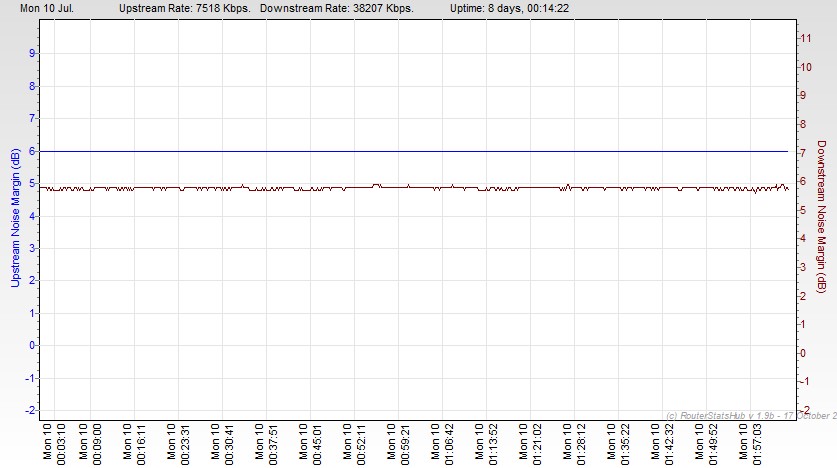
You could make some adjustments to the axis to make it clearer as currently they overlap. Adjusting the Graphs
I believe speeds are based on what observed rather than the predictions.
Get your comments about being ripped off, the price you pay is more for shorter contract periods, cheapest is 24 months.
Dan
Superusers are not staff, but they do have a direct line of communication into the business in order to raise issues, concerns and feedback from the community.
Re: using my own TP-Link 2100 router
10-07-2023 1:10 PM
- Mark as New
- Bookmark
- Subscribe
- Subscribe to RSS Feed
- Highlight
- Report to Moderator
so, something occurred at 02:30 this morning causing the downstream speed to drop yet again, this time down to 35 mbps. i'll bet you a pound to a pinch of that it will reboot/reset or whatever happens (my ip address hasn't changed) until it drops to the speed that plusnet now says the line will support, which is 33mbps. if it's DLM kicking in, why? what caused it to do that? the computer was obviously on but nothing else. that goes back to the earlier post i made of the speed dropping over 2 years from 41mbps to over 37mbps last year to what it is atm. io still dont understand why this is when there are no extra houses in the vicinity, no known changes in the vicinity other than the reported supported speed. so the customer pays extra twice! slower speed and an increase in costs! that's a bit naughty.
you've seen the snr pics from routerstats that i posted previously but i'll add the ones close to when the speed drop happened. i am hoping that someone can give a tangible reason because it's not good to continuously be on the receiving end of higher prices for a poorer quality service, something that has been going on for years and since i've been with plusnet (4 years?) as they now say the line will only support 33mbps and the speed is marginally above that, let alone above the 'guaranteed minimum, wont even be interested, even though something caused the speed drop again!




Re: using my own TP-Link 2100 router
10-07-2023 2:19 PM
- Mark as New
- Bookmark
- Subscribe
- Subscribe to RSS Feed
- Highlight
- Report to Moderator
Regurgitating conspiracy theories really is not helpful here.
It is not Plusnet which dictates the line speed, it is BT Openreach's circuit equipment which does that and that it would be the same across all suppliers using the same BT equipment.
You make assumptions based on what you think you can see - there might well have been no additional increase in dwellings, but an increase in uptake of FTTC could well have increased cross-talk between FTTC circuits. signal power (and thus speed) are adjusted dynamically so that all users get the best collective experience - high power VDSL can obliterate the experience of residual ADSL users.
What you pay for is an UP TO package based on what your line will do IN ITS ENVIRONMENT without detriment to adjacent users. If you are paying for the Unlimited Fibre Extra (the 80/20) service (and were previously above 40mbps) but the line can no longer sustain that, then there is a commercial matter to be discussed with COTS.
Contact Customer Options Team (aka COTS)
COTs is the place to go to if you want to find out anything to do with your contract in respect of leaving, renewing or simply enquiring about early termination charges (ETCs). They have their own number and tend to answer quicker than the general customer service number.
Direct dial numbers
- 0800 013 2632 or 0800 079 1133(from within the UK)
- +44 330 123 9197 (from abroad)
- Available...
- 8am - 8pm Monday to Friday
- 9am - 7pm Saturday
- 9am - 6pm Sunday
Your line itself looks fairly clean from what we have seen thus far: something appears to be generating a small level of steady clean RFI, but nothing ugly. Note that you will not see a change in IP address unless your router is offline from more than 90 minutes. Why do you think this is relevant?
How far is your property from the exchange?
A matter we have not examined - is your router plugged DIRECT into the master socket, using only the supplied cable and are there any extension cables / sockets connected to the line, available for telephony use (regardless of actually being used)?
The real question though is "What REAL issue are you encountering in the use of the internet, beyond you do not think you are getting your full pound of flesh for what you are paying?".
@willcutforth / @MatthewWheeler / @Gandalf (if available) ...
What does the DLM history report as the reasons for the disconnections which are giving this user such concern?
Do the reports indicate why the perceived line sync is diminishing?
What is the line's Longitudinal balance? [See page 18 here] I note that the line appears susceptible to evening time Continental AM radio interference, which might point to a line balance concern.
In another browser tab, login into the Plusnet user portal BEFORE clicking the fault & ticket links
Superusers are not staff, but they do have a direct line of communication into the business in order to raise issues, concerns and feedback from the community.
If this post helped, please click the Thumbs Up and if it fixed your issue, please click the This fixed my problem green button below.
Re: using my own TP-Link 2100 router
10-07-2023 3:16 PM
- Mark as New
- Bookmark
- Subscribe
- Subscribe to RSS Feed
- Highlight
- Report to Moderator
there's a lot of info in your last message, Townman, so tnx for that. the issues for me is why, year on year, there is a drop of downstream speed. upstream doesn't worry me as it's very rare that i upload anything. i appreciate that i pay for an 'up to' package, but when there appears to be no reason, the line speed drops and even then that seems to be a contract renewal time. as i stated previously, even last year my speed was given at 37+mbps, now, having just renewed contract, it's dropped to 33mbps. seems strange to me. there has been issues with the line since broadband has been available but plusnet seems to wanna do more 'burying the head in the sand' than most others, always using the 'your speed is such and such, which is above the guaranteed minimum' completely ignoring the frequent line drops, resets , reboots or whatever it is and using whatever excuse to not do anything. if there wasn't/isn't a problem os some sort, somewhere, why would the DLM kick in in the first place? it's there, surely, to try to keep the line stable and when it fails, a reset or whatever happens that drops my speed. what i dont understand is that for this to happen and for the dlm kicking not able to keep the line stable, there surely has to be a problem somewhere, doesn't there?
moving on to my router, it is approx 3 feet from the only bt socket in the house with no extension leads anywhere and the cable used is the one that was supplied with the router. i have tried another plusnet router and cable and different ethernet cables but they never make any difference. sooner or later, the same thing happens with that router and the cables. it gets pretty expensive renewing stuff to no avail when the issue is outside the home, not inside
i'm not sure on the distance my property is from the exchange, but as the cabling from the exchange to the cabinet is fibre, that wont matter, will it? the distance from the cabinet to my home is approx 1km and i appreciate that speed on copper will drop accordingly but i am not talking about that. what i am talking about and have tried to explain is the sudden, for no apparent reason, the line speed drops, not just from 1 contract renewal but to the next and, throughout the year, there are numerous dropouts, downstream speed reductions and general pain in the backside issues which shouldn't keep repeating and shouldn't, seemingly, be not able to be found and definitely not able to be repaired.
i have no idea what the DLM history says or even where to locate that info, just as i have no idea why the 'perceived line syncing diminishes'. i'm hoping this info is not directed at me.
i'm trying my best to help as much as i can, Townman and all others, but you have greater knowledge than i do, so somethings you want that are simple from your perspective, are not so for me. sorry
Re: using my own TP-Link 2100 router
10-07-2023 3:50 PM
- Mark as New
- Bookmark
- Subscribe
- Subscribe to RSS Feed
- Highlight
- Report to Moderator
have just changed new contract from 18 months down to 12 months. have been given new figures for up/down speed. guaranteed downstream is 31.1mbps. speed test showed 31.5mbps (whooppee) so plusnet not interested in finding out what caused the speed drop this morning as i'm getting 500kbps more than the guaranteed minimum of 31.3mbps. if it drops lower, then tell plusnet
Re: using my own TP-Link 2100 router
10-07-2023 4:16 PM
- Mark as New
- Bookmark
- Subscribe
- Subscribe to RSS Feed
- Highlight
- Report to Moderator
A bit of reading around the subject matter offers a good deal of insight. This is not a conspiratorial "they are out to get you" space, but true space governed by the laws of physics.
"but as the cabling from the exchange to the cabinet is fibre, that wont matter, will it?"
Such thinking ignores the consideration that the connection from the cabinet is copper, the signal is far higher frequency than ADSL and therefore the signal fall off with distance is much more acute. Here is some helpful back ground reading - VDSL2 (FTTC) Speed vs. Distance | Increase Broadband Speed - unfortunately the page does not seem to be delivering the very informative graph, but the text is plain enough to read...
"Speeds fall to about 60 Mbps when 500 m away from the street cabinet and, at 1 km, about 28 Mbps connection speed can be achieved."
So if you are actually 1km from the cabinet, then your experience is somewhat above expectations. See this graph for an illustration of speed fall off on distance from the cabinet - Chart-FTTC-speed-against-distance | Increase Broadband Speed
You will observe that the speed fall off gradient is the steepest between 400m and 900m which covers your probable distance. Therefore you can expect that any marginal variation in line and environmental characteristics might result in marked changes in performance.
As advised before, signal power levels are adjusted so as to achieve optimal speeds whilst not interfering adversely with the speed enjoyed by others. The speeds reported at contract renewal are those provided by BT Openreach (not Plusnet) and will reflect the actual observed average speeds in your location. Are BT OPENREACH lowering the minimum guaranteed speeds so that they can deliver a better overall service to users across the piece, would be an interesting question to raise with them. One thing for sure though, this is NOT something being done by Plusnet.
DLM history - that was a question asked of the staff members I tagged.
"general pain in the backside issues which shouldn't keep repeating and shouldn't, seemingly, be not able to be found and definitely not able to be repaired"
Do not think I have seen such reported here - you've inferred that you feel you are getting less than you think you should year on year, but you have not explained how a little less speed actually impacts your use of the internet. Unless you have a houseful of people hammering the internet a few mbps here or there is unlikely to have a material impact on using the internet. Sub 10mbps is more than adequate for watch on demand viewing. If that exhibits buffering then there is probably an issue elsewhere.
Copper is a vulnerable conduit, if can have been fixed yesterday and be broken today. Unless an engineer checks every joint, there is the possibility that the most obvious one DETECTED that day gets fixed and another marginal one shows no issue THAT DAY. I have experienced the local circuit breaking 30 minutes after being repaired - sometimes copper wires (certainly aluminium) will stress fracture where they have been worked on.
Unless the staff can identify the DLM disconnection reasons and no fault is found on the circuit, then if you NEED better than 34mbps you will either need to move closer to the cabinet or switch to FTTP, which delivers the same speeds everywhere, irrespective of distance. Well effectively it does, light only travels at the speed of light so travelling twice the distance will take twice the time, but I doubt not even the most discerning will notice the difference.
In another browser tab, login into the Plusnet user portal BEFORE clicking the fault & ticket links
Superusers are not staff, but they do have a direct line of communication into the business in order to raise issues, concerns and feedback from the community.
If this post helped, please click the Thumbs Up and if it fixed your issue, please click the This fixed my problem green button below.
Re: using my own TP-Link 2100 router
10-07-2023 4:18 PM
- Mark as New
- Bookmark
- Subscribe
- Subscribe to RSS Feed
- Highlight
- Report to Moderator
@prettygrim49 wrote:
have just changed new contract from 18 months down to 12 months. have been given new figures for up/down speed. guaranteed downstream is 31.1mbps. speed test showed 31.5mbps (whooppee) so plusnet not interested in finding out what caused the speed drop this morning as i'm getting 500kbps more than the guaranteed minimum of 31.3mbps. if it drops lower, then tell plusnet
In the big scheme of things 500mbps is neither here nor there - you still have not indicated how these variations actually impact detrimentally your internet experience.
In another browser tab, login into the Plusnet user portal BEFORE clicking the fault & ticket links
Superusers are not staff, but they do have a direct line of communication into the business in order to raise issues, concerns and feedback from the community.
If this post helped, please click the Thumbs Up and if it fixed your issue, please click the This fixed my problem green button below.
Re: using my own TP-Link 2100 router
10-07-2023 4:57 PM
- Mark as New
- Bookmark
- Subscribe
- Subscribe to RSS Feed
- Highlight
- Report to Moderator
i understand the difference that distance will make to a connection and the speed, which is why i put in the above response about fibre only being to the cabinet. i've already said about copper to the home from the cabinet. as for FTTP, i cant wait but it isn't me or the private company that has already installed the cabling that it preventing this from happening, it's from according to a very good source, it's Openreach not doing whatever it needs/should do to get FTTP actually enabled. i dont know if that is true or not. i also dont know why, year on year, with no additional houses having been built, the speed drops. i do remember reading where ISPs were told to give better speed estimates, to be more open and honest to customers about should or shouldn't be expected for their connection before signing up, then ISPs given the opportunity to throw that out the window by being given a guaranteed minimum speed, which is about 5mbps less than the info passed on to customers. that seems to throw what they're supposed to say out the window. i'm talking about all isps here, not just plusnet but if that extra reduction in speed is needed, why give customers disinformation?
i dont infer how the lowering of speed interferes because i cant, but what other service is bought and paid for by customers when the supplier has so many ways out of supplying what customers are paying for? if what is being received is less for whatever reason, surely using excuses that dont help are irrelevant, aren't they? if what happens with my connection was an infrequent happening that didn't lower the speed, it would be irrelevant but the frequency that it happens and the always reduction in speed is not irrelevant. if someone went tothe bank for £5 of change, given for no fee in an exchange and only received £475, the customer would not be happy. why should it be any different with broadband? i cant physically pick up my house and move it to anywhere to improve the service. just as people are desperate to have the service enabled and cant. you say for me to switch to it, Townman and i can assure you, if i could, i would be on it like a rash!
i dont know why the DLM kicks in, i just know that it's a nuisance for doing so, reducing my connection speed and often causing other reboots/resets to follow. i dont know if it's possible to discover why this happens but if it can be, there must be a way of fixing it. and remember, this isn't a one-off happening, it's a constant occurring thing that only me, the customer suffers from. it certainly doesn't stop the fees charged or make the service constant. i appreciate that we all use/need the internet and it is a guaranteed human right. shame that condition doesn't extend to being more serviceable.
Re: using my own TP-Link 2100 router
10-07-2023 6:28 PM
- Mark as New
- Bookmark
- Subscribe
- Subscribe to RSS Feed
- Highlight
- Report to Moderator
i hope i haven't offended anyone but the comment of 'how does a slower speed affect what you do on the internet' should never even be said, let alone relevant. the whole crux of the matter is that customers are paying for a service and those, like me, whose speed keeps being reduced should not be put in the position of answering that stated question, the whole reason for me requesting assistance here in the first place. i could sit and read as many articles as you like but it doesn't mean i will understand everything written in them and why should i have to do so anyway? like every other service that customers pay for, it should be stable and consistent, not higgledy piggledy, up one minute, down the next, especially when the customer hasn't done anything wrong to cause the fluctuations. it isn't right, in my view either, that all the ISPs should have multiple 'get out of jail free' cards when it comes to giving the service they charge for. the biggest of these 'get out of jail free' cards is the well-used option of saying 'NO'. customers pay for a service and when that service is less than they are told at start-up, there should be no option but to do whatever is possible to get that service back to state it should be in! if speed wasn't important to EVERYONE, why is full fibre not only so important but being advertised as being the best thing since sliced bread, that every household and customer should not only want it but demand it, especially when it is still not available, simply because the biggest culprits, BT and Openreach, have delayed it as long as possible and are still holding ISPs and customers to ransom by allowing cabling to be installed but not then enabling everything to make full fibre actually work? yet another money spinning operation in place, yet another one that doesn't help customers with p**s poor broadband atm and no possibility of improvement any time soon!
Re: using my own TP-Link 2100 router
10-07-2023 7:50 PM
- Mark as New
- Bookmark
- Subscribe
- Subscribe to RSS Feed
- Highlight
- Report to Moderator
@prettygrim49 wrote:
i hope i haven't offended anyone but the comment of 'how does a slower speed affect what you do on the internet' should never even be said, let alone relevant.
But it is very relevant - there is a big difference between a state of affairs which impacts your actual USE of the service (that is there is a material fault***) as opposed to you think you are not getting a full pound of flesh for what you believe you are paying for, regardless of the fact you cannot actually consume the full pound of flesh if you had it. So I will ask again - what actual detriment is a slightly slower speed having on your USE of the service?
@prettygrim49 wrote:
i could sit and read as many articles as you like but it doesn't mean i will understand everything written in them and why should i have to do so anyway? like every other service that customers pay for, it should be stable and consistent, not higgledy piggledy, up one minute, down the next, especially when the customer hasn't done anything wrong to cause the fluctuations.
Because often the real world is nothing like how people think it should work. They are incognisant of the realities of running telecommunication systems - and saying they should not need to know does not alter reality, just because they might not like the answer or simply do not wish to understand how things are. The article pointed to uses very simple explanations of why speeds might be impacted - the fact that you do not understand that does not make them ignorable.
Physics is physics - just because you cannot see what influences services does not mean that it does not exist or that it can always be controlled. You have been advised that the most likely cause of the change in speeds is an increased take up of VDSL2 by the unchanged number of properties ... giving rise to the need to manage circuit cross talk for the benefit of all concerned ... something which you cannot see.
@prettygrim49 wrote:
... that doesn't help customers with p**s poor broadband atm and no possibility of improvement any time soon!
But you have not articulated anything which mentions poor PERFORMANCE ... you have only mentioned a conspiracy to slightly lower SYNC speeds which you have not shown to be making a material difference to YOUR USE of the internet.
The DLM regularly reprofiling the line is a tad unusual, but from what has been observed does not appear to be of material concern. A single disconnection from time to time is nothing to lose sleep over. If you were seeing 6+ disconnections per day which took several minutes to reconnect, that would be a different matter. You have suggested that at the times the disconnections occur, your PC is intentionally disconnected from the internet ... so again how does a disconnection at 2am impact your use of the service?
What is your purpose here - to get help to fix a real issue fix or sound off that you feel that you are being short changed in not getting more than you can actually use? You have not mentioned the typical issues associated with data through put, latency or service responsiveness as might be encountered by a high concurrent usage household or a hard-on gamer.
So that relevant help can be offered, please answer only the following questions...
- Do you have examples of the service being "up one minute, down the next" DURING THE TIME YOU were using it?
- Do you have examples of how the marginal reduction of your line speed has impacted to your ability to access internet services
*** I hope that one of the staff tagged might be able to offer some insight as to why the DLM is micro adjusting the line (which does not mean that there is a fault), as simple standard optimisation activity. I do not recall - have you run the voice and broadband fault bots? See the faults links below.
In another browser tab, login into the Plusnet user portal BEFORE clicking the fault & ticket links
Superusers are not staff, but they do have a direct line of communication into the business in order to raise issues, concerns and feedback from the community.
If this post helped, please click the Thumbs Up and if it fixed your issue, please click the This fixed my problem green button below.
- Subscribe to RSS Feed
- Mark Topic as New
- Mark Topic as Read
- Float this Topic for Current User
- Bookmark
- Subscribe
- Printer Friendly Page
- Plusnet Community
- :
- Forum
- :
- Help with my Plusnet services
- :
- Broadband
- :
- using my own TP-Link 2100 router